Creating a professional presentation used to mean spending hours choosing templates, writing slide copy, finding images, adjusting layouts, and fixing formatting.
In 2026, AI presentation tools can automate much of that process.
Instead of starting with a blank PowerPoint or Google Slides document, you can describe what you want, provide an outline or upload source material, and let an AI presentation maker create a structured first draft.
But there is an important distinction:
AI can help you create slides faster, but it does not automatically create a great presentation.
The strongest results come from combining AI-generated structure and design with human judgment, fact-checking, storytelling, and editing.
This guide explains how AI presentation tools work, which tools are worth considering, what each one is best for, and how to create better presentations with AI.
What Are AI Tools for Presentations?
AI tools for presentations are software applications that use artificial intelligence — typically large language models (LLMs) combined with design algorithms — to automate some or all of the slide creation process. Instead of manually building each slide, you provide a prompt, an outline, or existing content, and the tool generates structured slides, chooses layouts, writes or refines copy, and applies visual design automatically.
These tools generally fall into three categories:
- Generation-first tools, which build an entire deck from a topic or outline (e.g., Gamma, Tome, Beautiful.ai).
- Assistant tools, which work inside existing software like PowerPoint or Google Slides to help with content, formatting, or design suggestions (e.g., Microsoft Copilot, Canva Magic Design).
- Content-conversion tools, which transform other formats — documents, PDFs, or long-form text — directly into slide decks (e.g., SlidesAI, Plus AI).
The common thread across all of them is that AI handles the repetitive, time-consuming parts of deck-building — structure, layout, and first-draft copy — so you can spend your time on the message and the delivery.
How Do AI Presentation Tools Work?
Most AI presentation tools follow a similar underlying process, even though the interfaces differ:
- Input collection — You provide a prompt, topic, outline, document, or transcript.
- Content structuring — The AI’s language model breaks your input into a logical sequence: title slide, agenda, key sections, supporting points, and a closing slide.
- Copy generation — The model writes headlines, bullet points, and speaker notes based on your input, matching a requested tone (formal, persuasive, casual, technical).
- Design application — A design engine selects layouts, fonts, color palettes, and image placement, often pulling from a library of templates or generating custom graphics.
- Refinement loop — You edit, regenerate individual slides, adjust the theme, or ask the AI to “make this more concise” or “add a chart here,” and the tool updates the deck accordingly.
The result is a working first draft — sometimes a genuinely presentation-ready one — that would otherwise take hours to assemble manually.
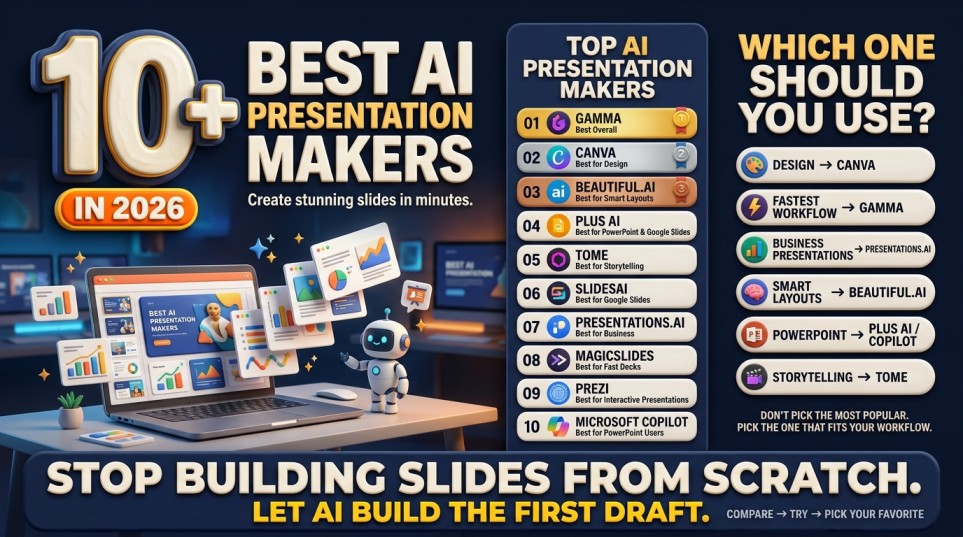
What Are the Best AI Tools for Presentations in 2026?
The right tool depends on your use case — sales pitches, internal reports, investor decks, or classroom teaching all have different needs. Here’s a breakdown of the most widely used options and what each is best suited for.
| Tool | Best For | Key Strength | Free Plan? |
|---|---|---|---|
| Gamma | Fast, modern decks from a prompt or outline | Clean auto-design, works for docs/webpages too | Yes (limited credits) |
| Tome | Narrative, story-driven presentations | Strong AI writing + visual storytelling | Yes (limited) |
| Beautiful.ai | Business and sales decks | Smart templates that auto-adjust design rules | Trial only |
| Microsoft Copilot for PowerPoint | Teams already using Microsoft 365 | Deep integration with existing files and brand templates | Requires Copilot license |
| Canva Magic Design | Marketing and visually-driven decks | Massive design asset library + brand kits | Yes (limited) |
| Plus AI | Converting docs/outlines into Google Slides or PowerPoint | Works inside tools you already use | Trial only |
| SlidesAI | Turning long text into quick slide summaries | Simple, fast text-to-slide conversion | Yes (limited) |
| Prezi AI | Non-linear, zoom-style presentations | Dynamic, non-traditional visual flow | Trial only |
Quick takeaway: If you want speed and polish with minimal setup, Gamma or Tome are strong starting points. If your organization already runs on Microsoft or Google Workspace, Copilot or Plus AI will fit more naturally into your existing files and permissions.
Are AI Presentation Tools Free?
Most AI presentation tools use a freemium model. Here’s what that typically looks like:
- Free tiers usually cap the number of AI-generated decks or “credits” per month (often 3–10 generations).
- Paid tiers ($8–$25/month per user, roughly) unlock unlimited generations, premium templates, brand kits, and export options (PDF, PPTX, or presenter mode).
- Enterprise plans add team collaboration, admin controls, and integrations with tools like Slack, Salesforce, or SharePoint, often at custom pricing.
If you only need a handful of decks a month, a free plan is often enough. Frequent users — especially in sales, consulting, or education — usually find the paid tier pays for itself in time saved within the first one or two presentations.
Can AI Create a PowerPoint Presentation?
Yes. AI tools can generate presentation content and, depending on the platform, create or export editable PowerPoint files.
For example, Gamma currently supports exporting generated presentations to PPTX.
However, there is an important warning:
Never assume that an AI-generated PowerPoint is finished just because the file has been created.
You should review:
- Facts
- Statistics
- Sources
- Slide order
- Visual accuracy
- Formatting
- Grammar
- Brand consistency
- Charts
- Speaker notes
AI is excellent at accelerating production.
It is not a substitute for quality control.
Can AI Create a Presentation From a PDF?
Yes, some AI presentation tools can use existing documents as source material.
This is one of the most useful applications of AI presentations.
Imagine you have a 40-page report.
Instead of manually reading it and copying information into PowerPoint, you can use an AI presentation workflow to:
PDF → Summary → Key ideas → Slide structure → Presentation
Gamma, for example, supports importing documents such as PDFs and PowerPoint files as part of its workflow.
This can be useful for:
- Research papers
- Business reports
- Annual reports
- Academic articles
- Market research
- Meeting documents
- Training materials
However, source-grounded generation still requires verification.
An AI system can misunderstand a table, omit important context, or incorrectly summarize a technical statement.
How Do I Choose the Right AI Presentation Tool?
The best tool depends on three factors: what you’re presenting, who you’re presenting to, and what system you already work in.
| If you need… | Consider… |
|---|---|
| Fast, prompt-based decks with minimal editing | Gamma or Tome |
| Deep integration with PowerPoint you already use | Microsoft Copilot |
| Strong visual/marketing design | Canva Magic Design |
| To convert long documents into slides | Plus AI or SlidesAI |
| A non-linear, visually dynamic format | Prezi AI |
| Rigid, professional business templates | Beautiful.ai |
A practical approach: pick one tool, run a real presentation you actually need to build through it, and judge the output against three criteria — accuracy of content, design quality without manual fixes, and how much editing time it actually saved you.
Are AI-Generated Presentations Good Enough for Investor or Business Decks?
AI tools are strong at producing a structurally sound first draft — clear narrative flow, consistent design, and readable copy. Where they fall short for high-stakes decks like investor pitches is strategic judgment: knowing which data point actually matters to a specific investor, how to frame a weakness honestly without undermining confidence, or how to sequence an argument for maximum persuasive impact.
A practical workflow that works well:
- Use AI to generate the structural draft (30–50% of the work).
- Manually rewrite the narrative arc and key persuasive moments.
- Have the AI polish tone, tighten copy, and unify design at the end.
This hybrid approach captures the speed benefit of AI without outsourcing the parts of a pitch that require real judgment.
AI Presentation Tools vs Traditional PowerPoint
| Feature | Traditional PowerPoint | AI Presentation Tool |
|---|---|---|
| Start from blank page | Yes | Often no |
| Generate outline | Manual/AI-assisted | Often automated |
| Generate slide copy | Manual | Automated |
| Automatic layouts | Limited | Strong |
| Generate visuals | Manual/additional tools | Often integrated |
| Brand customization | Strong | Varies |
| Human control | Very high | High after editing |
| Speed | Moderate | High |
| Fact-checking required | Yes | Yes |
| Best for | Maximum control | Fast creation |
AI doesn’t necessarily replace PowerPoint.
In many workflows, it makes PowerPoint faster.
What Is the Best AI Presentation Workflow for Students?
Students can use AI presentations for:
- Class projects
- Research presentations
- Thesis presentations
- Study summaries
- Group projects
- Seminar presentations
A useful workflow is:
Research → AI summary → Fact-check → Slide outline → AI presentation → Human editing → Practice
However, students should follow their institution’s academic-integrity rules and clearly distinguish their own work from AI-generated material when required.
A Powerful AI Prompt for Presentations
Create a professional presentation about [TOPIC] for [AUDIENCE].
The objective is to help the audience understand [OBJECTIVE].
Create [NUMBER] slides.
Structure the presentation as:
- Hook
- Problem
- Why it matters
- Key insights
- Examples
- Data/evidence
- Practical solution
- Common mistakes
- Action plan
- Conclusion
Give every slide a strong, specific headline.
Keep slide text concise and avoid paragraphs.
For each slide provide:
- Slide headline
- 3–5 concise bullet points
- Suggested visual
- Speaker notes
Use a [PROFESSIONAL/MODERN/MINIMAL/EDUCATIONAL] visual style.
Do not invent statistics. Clearly mark information that requires verification.
FAQ
What is the best AI presentation maker?
For many users who prioritize fast prompt-to-deck generation, Gamma is one of the strongest options. Canva is particularly useful for visual design, Beautiful.ai emphasizes consistent professional layouts, and Pitch is strong for collaborative branded presentations.
Is there a free AI presentation maker?
Yes. Several platforms offer free tiers or limited free AI presentation functionality. Gamma, for example, currently offers a free plan with AI credits and presentation creation features.
Can AI make a PowerPoint presentation?
Yes. Some AI presentation platforms can generate decks and export them as PPTX files. Gamma is one example.
Can AI make slides from text?
Yes. AI presentation makers can transform prompts, outlines, and other text into structured slide decks. Gamma and Canva both explicitly support text-to-presentation workflows.
Can AI make a presentation from a PDF?
Yes. Some tools can use PDF files as source material. Gamma supports PDF importing as part of its presentation workflow.
Can AI create presentation images?
Many modern AI presentation platforms can generate, select, or incorporate visuals. Canva and Gamma both provide AI-assisted visual capabilities.
Can AI write speaker notes?
Yes. AI can generate speaker notes from the slide content, helping presenters explain ideas without overcrowding slides.
Can AI create presentations for students?
Yes. Students can use AI to brainstorm, structure, summarize, and design presentations. They should still follow their school’s academic-integrity policies.
Final Verdict: Are AI Presentation Tools Worth Using?
Yes—if you use them as productivity tools rather than replacements for thinking.
The biggest advantage of AI presentation software isn’t that it can make attractive slides.
It’s that it can compress the distance between:
Idea → Outline → Draft → Presentation
Instead of spending hours formatting slides, you can spend more time thinking about the message, audience, evidence, and story.
For most beginners, a simple approach is enough:
Start with an AI assistant for research and structure.
Use an AI presentation maker for design and slide generation.
Fact-check the content.
Edit the slides yourself.
Practice the delivery.