
Best AI Apps for iPhone 2026
Artificial intelligence has moved far beyond simple chatbots. In 2026, your iPhone can use AI to write emails, summarize documents, research complicated topics, edit photos, generate videos, transcribe meetings, improve your writing, and even interact with information across your apps.
That makes choosing the best AI apps for iPhone 2026 more complicated than simply downloading the most popular chatbot.
Some AI apps are designed for conversation. Others are much better for research, productivity, writing, image creation, video editing, or business tasks. Apple has also expanded Apple Intelligence and Siri AI at the system level with iOS 27, so iPhone users now have both built-in AI and a large ecosystem of third-party AI apps. Apple says the latest Apple Intelligence features are available on supported devices including the iPhone 15 Pro and 15 Pro Max and iPhone 16 models or later, with availability varying by language and region.
This guide explains the leading AI apps for iPhone in 2026, what each one does best, who should use it, and how to choose the right combination for your daily workflow.
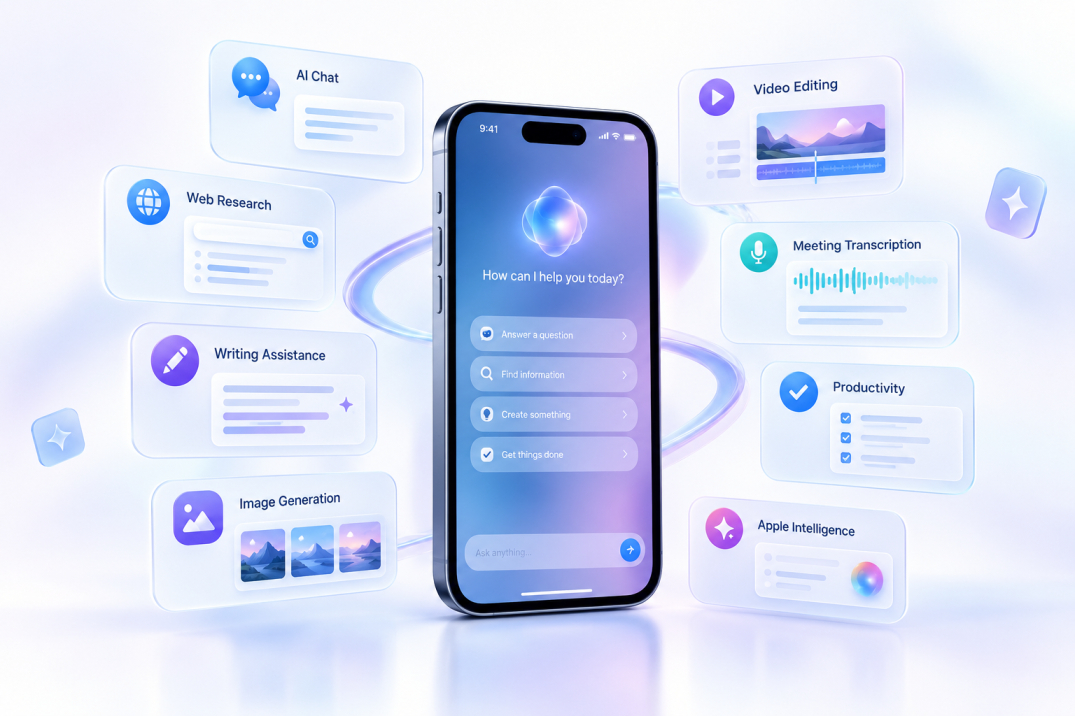
Quick Comparison: Best AI Apps for iPhone in 2026
| AI App | Best For | Key Strength | Free Version |
|---|---|---|---|
| Apple Intelligence | Built-in iPhone assistance | Siri, writing, system integration | Yes, on supported devices |
| ChatGPT | General-purpose AI | Conversation, writing, research, images, voice | Yes |
| Claude | Writing and complex tasks | Long-form writing, reasoning, coding | Yes |
| Google Gemini | Google users | Search, Google services, multimodal AI | Yes |
| Perplexity | Research | AI search with citations | Yes |
| Microsoft Copilot | Office productivity | Word, Excel, PowerPoint, Outlook integration | Yes |
| Canva | Design and content creation | AI design, images, video | Yes |
| Adobe Firefly | Generative media | AI images and video | Yes |
| Otter | Meetings and transcription | Live transcription and summaries | Yes |
| Grammarly | Writing | Keyboard, rewriting, tone and grammar | Yes |
| Photoroom | Product photography | AI backgrounds and product images | Yes |
| CapCut | Video creation | AI video editing and generation | Yes |
| ElevenReader | Listening and accessibility | Natural-sounding text-to-speech | Yes |
The right app depends less on the name of the AI model and more on what you actually want to do with your iPhone.
1. Apple Intelligence: Best Built-In AI for iPhone
Apple Intelligence deserves a place on any list of the best AI apps for iPhone 2026, even though it is not a traditional App Store download.
Instead, Apple Intelligence is integrated into iOS and works throughout Apple’s ecosystem. With iOS 27, Apple introduced its next-generation Siri AI with features including conversational interaction, personal context, onscreen awareness, and broader system-level actions.
Apple’s approach is particularly interesting for people who care about privacy and system integration. Apple says many AI operations are performed on-device, while more demanding requests can use Private Cloud Compute. Apple also states that data processed through Private Cloud Compute is not stored and is used only to fulfill the request.
What can you use Apple Intelligence for?
You can use Apple’s AI features for tasks such as:
- Rewriting and proofreading text
- Summarizing information
- Generating and editing images
- Understanding content on your screen
- Finding information through Siri
- Working with information from supported apps
- Translating and communicating across languages
- Performing system-level actions
The major advantage is that you do not necessarily have to open a separate AI application every time you need assistance.
Who should use Apple Intelligence?
Apple Intelligence is especially useful for iPhone users who want AI to become part of the operating system rather than another standalone service.
Keep in mind that Apple Intelligence requires compatible hardware, and features can vary by language and region.
2. ChatGPT: Best All-Purpose AI App for iPhone
ChatGPT is one of the most versatile AI apps available on iPhone.
The official iOS application is published by OpenAI, and OpenAI recommends checking that the App Store listing is published by OpenAI when installing it.
What makes ChatGPT particularly useful on a smartphone is its flexibility. You can use it for quick questions, brainstorming, writing, planning, learning, analyzing images, and voice conversations.
What can ChatGPT do on iPhone?
Typical uses include:
- Write or rewrite emails
- Summarize articles and documents
- Explain difficult subjects
- Brainstorm business ideas
- Create travel itineraries
- Analyze images and screenshots
- Generate creative content
- Practice languages
- Help with coding
- Have voice-based conversations
Multimodal interaction has long been part of ChatGPT’s mobile experience, allowing users to speak to the assistant and provide images for analysis.
Why ChatGPT is useful on mobile
The biggest advantage is versatility. You might use it as a writing assistant in the morning, a tutor in the afternoon, and a brainstorming partner in the evening.
For many people, installing just one AI app on an iPhone, ChatGPT is a logical starting point because it covers so many different use cases.
Best for
Everyday AI, writing, learning, brainstorming, voice interaction, image analysis, and general productivity.
3. Claude: Best AI App for Writing and Complex Work
Claude by Anthropic is another major AI assistant available on iPhone. The App Store describes it as an AI assistant for life and work with capabilities for writing, research, coding, and complex problem-solving.
Claude can be particularly attractive to users who frequently work with lengthy instructions, reports, documents, or code.
Its writing-focused workflow is useful when you do not simply want text generated—you want an existing idea transformed into something clearer, more structured, and more natural.
Anthropic has also expanded Claude’s ability to interact with iOS apps. According to Anthropic, Claude can work with supported system apps such as Messages, Mail, Calendar, Maps, and Reminders, allowing it to help with tasks such as drafting messages, preparing emails, creating calendar events, and managing reminders.
Practical Claude use cases
Imagine you receive a long work email on your iPhone. Instead of simply asking Claude to summarize it, you can ask:
“Summarize this email, identify the three actions I need to take, and draft a professional response.”
For writers, students, researchers, developers, and professionals, that workflow can be significantly more useful than simple question-and-answer chat.
Best for
Long-form writing, document analysis, research, coding, and complex instructions.
4. Google Gemini: Best for Google Ecosystem Users
Google Gemini is one of the most important AI apps for iPhone in 2026, particularly if you already use Google’s ecosystem.
Google has significantly expanded Gemini’s capabilities during 2026. Google announced new agentic features, daily briefs, and broader integrations, while later updates introduced more connected apps and services.
Gemini can become especially useful when you already rely heavily on Google Search, Gmail, Google Photos, YouTube, and other Google services.
Google also introduced personalized AI experiences that can use connected Google services such as Gmail, Google Photos, YouTube, and Search, subject to user permission.
Why Gemini stands out
Gemini is more than a conversational AI app. Its value comes from the surrounding Google ecosystem.
For example, a user might ask for help planning an event and then use connected information from Google services to make the answer more relevant.
Google reported that more than 100 million active Gemini users were using the service on iOS in 2026.
Best for
Google users, multimodal tasks, connected services, voice interactions, and personalized assistance.
5. Perplexity: Best AI App for Research and Search
Perplexity is different from a traditional chatbot because its primary identity is AI-powered search and research.
The iPhone app provides answers supported by sources and citations, while advanced features such as Pro Search and Deep Research are designed for more comprehensive investigations.
This makes Perplexity particularly useful when you care about where the answer came from.
When should you use Perplexity?
Use Perplexity when you need to:
- Research a product
- Compare technologies
- Find recent information
- Investigate a topic
- Collect sources for an article
- Research competitors
- Explore current events
- Build a preliminary research brief
For example, instead of searching ten websites manually for “best laptops for video editing,” you can ask Perplexity to compare the current options and provide supporting sources.
A critical reminder
Citations make research easier to verify, but they do not guarantee that every AI-generated statement is correct. You should still open important sources and verify critical information.
Best for
Research, current information, source discovery, comparisons, and fact-checking workflows.
6. Microsoft Copilot: Best AI App for Microsoft 365 Users
Microsoft Copilot is particularly powerful for people who work with Word, Excel, PowerPoint, Outlook, and Teams.
The iPhone application connects with Microsoft’s productivity ecosystem and can help create documents, presentations, and spreadsheets, summarize files, draft emails, analyze information, and brainstorm ideas.
For a Microsoft 365 user, the advantage is workflow integration.
Instead of copying information between multiple AI tools and office applications, Copilot is designed around the Microsoft environment.
Microsoft also supports voice features in Copilot, including dictation, read-aloud functionality, and voice conversations on supported devices and languages.
Best for
Business users, Microsoft 365 customers, email, documents, presentations, spreadsheets, and workplace productivity.
7. Canva: Best AI App for Design and Social Media
Canva has evolved from a simple graphic-design platform into a broad AI-assisted creative suite.
The iPhone app supports graphic design, photo editing, presentations, social media content, video creation, and AI-powered features. The current App Store listing also highlights AI video generation and newer tools such as Magic Layers and Magic Video.
Canva is particularly useful if you need visual content but are not a professional designer.
What can you create?
With Canva, you can create:
- Instagram posts
- YouTube thumbnails
- Presentations
- Posters
- Resumes
- Social media videos
- Advertisements
- Brand graphics
- Marketing materials
Its AI tools can speed up ideation, editing, and production.
Best for
Content creators, marketers, social media managers, small businesses, students, and non-designers.
8. Adobe Firefly: Best AI App for Generative Images and Video
Adobe Firefly is a strong choice for people who want dedicated generative-media tools.
Adobe’s mobile documentation confirms support for text-to-image, text-to-video, image-to-video, and generative expand features in the Firefly mobile experience.
The workflow is straightforward: describe what you want, select the relevant generation tool, and refine the result.
For example:
“Create a cinematic product photo of a black smartwatch on a futuristic desk with dramatic studio lighting.”
Firefly can then generate visual concepts that you can continue editing through Adobe’s creative ecosystem.
Adobe also provides prompt-enhancement capabilities and multiple image-generation models in the mobile experience.
Best for
Graphic designers, marketers, creators, advertisers, and users focused on AI-generated visual content.
9. Otter: Best AI App for Meetings and Voice Notes
Not every AI app needs to generate paragraphs or images.
Otter focuses on one increasingly important problem: turning conversations into useful information.
Its iPhone app provides real-time transcription and AI-generated meeting notes, summaries, and captured slides. It supports meeting workflows involving services such as Zoom, Google Meet, and Microsoft Teams.
Practical uses for Otter
You can use it to:
- Record meetings
- Transcribe interviews
- Capture lectures
- Summarize conversations
- Organize meeting notes
- Review discussions later
For students, journalists, consultants, managers, and professionals who frequently attend meetings, this can save considerable manual note-taking time.
Best for
Meetings, interviews, lectures, voice notes, and transcription.
10. Grammarly: Best AI Writing App for iPhone
Grammarly becomes particularly useful when your writing happens across multiple iPhone apps rather than in one dedicated editor.
Its iPhone keyboard provides writing feedback, grammar suggestions, AI rewriting, tone assistance, and voice-dictation cleanup.
This is useful because you can improve writing directly inside messages, emails, notes, and other apps without repeatedly copying text into a chatbot.
Grammarly is useful for
- Emails
- Text messages
- LinkedIn posts
- Business communication
- Essays
- Social media
- Customer support responses
Its AI rewriting tools can adjust writing for length, fluency, and tone, while its keyboard provides real-time writing assistance.
Best for
People who write frequently on their iPhone and want AI assistance directly inside their keyboard.
11. Photoroom: Best AI Photo App for Online Sellers
Photoroom is designed around AI-powered visual editing, particularly product photography.
The iPhone app can remove and replace backgrounds, generate lifestyle product images, create flat-lay and on-model visuals, batch-edit product photos, and prepare images for marketplaces.
This makes it particularly valuable for small businesses and online sellers.
Suppose you sell shoes online. Instead of photographing every product in an expensive studio, you can photograph the product with your iPhone and use AI tools to create a cleaner visual environment.
Photoroom also offers features designed for e-commerce platforms and product-listing workflows.
Best for
E-commerce, Shopify sellers, marketplace listings, product photography, and small businesses.
Which AI App Should You Choose?
There is no single AI app that is perfect for every iPhone user.
The better strategy is to choose based on your main workflow.
For everyday questions
Start with ChatGPT, Gemini, or Claude.
For research
Perplexity is designed specifically around AI-powered search, source discovery, and research workflows.
For writing
Consider Claude, ChatGPT, or Grammarly.
Claude is designed for deeper writing and complex documents, while Grammarly has the advantage of working directly through the iPhone keyboard.
For Google users
Gemini makes the most sense when you already use Google services heavily.
For Microsoft users
Copilot is particularly relevant when your work revolves around Word, Excel, PowerPoint, Outlook, and Teams.
For design
Choose Canva for an all-in-one design workflow or Adobe Firefly for dedicated generative image and video creation.
For video
Try CapCut for mobile-first video editing and social content.
For business photography
Photoroom is particularly useful for product images and online stores.
For meetings
Otter is a practical option for transcription and AI-generated meeting notes.
What Is the Best Free AI App for iPhone in 2026?
The answer depends on how you define “best.”
A general-purpose user may get the most value from ChatGPT, Gemini, or Claude because they cover a wide range of everyday tasks.
A research-oriented user may prefer Perplexity because its workflow is centered on search results and cited answers.
A Microsoft 365 user may get greater practical value from Copilot, while a content creator may find Canva or CapCut more useful than a traditional chatbot.
It is also important to remember that “free” does not always mean unlimited. AI apps commonly place limits on advanced models, generation, research, storage, or usage frequency. These limits and subscription packages can change over time, so check the current App Store listing or vendor pricing page before subscribing.
A Powerful AI App Combination for iPhone Users
You do not necessarily need ten AI applications.
For many users, a simple combination of three or four tools can cover most needs.
A practical setup could be:
ChatGPT + Perplexity + Canva + Apple Intelligence
ChatGPT handles general AI tasks, Perplexity handles research, Canva handles visual content, and Apple Intelligence provides built-in system assistance.
For a business professional, another combination could be:
Claude + Copilot + Grammarly + Otter
This covers complex writing, Microsoft productivity, communication, and meetings.
For a content creator:
ChatGPT + Canva + CapCut + Firefly
This combination can cover brainstorming, design, video editing, and generative visual creation.
The goal is not to collect as many AI apps as possible. The goal is to build a workflow in which each tool has a clear purpose.
Are AI Apps Worth Installing on an iPhone in 2026?
For many users, yes—but the value comes from how the tools are used.
AI becomes much more practical on an iPhone because smartphones already provide access to your camera, microphone, messages, files, location, calendar, and other forms of contextual information.
The result is a shift from “asking an AI a question” toward using AI as an everyday assistant.
For example, instead of asking:
“What should I do on my trip?”
you might use AI to research destinations, summarize options, create a schedule, draft messages, translate text, analyze photos, and organize your plans.
That is where mobile AI becomes genuinely useful.
Final Thoughts: Best AI Apps for iPhone 2026
The best AI apps for iPhone 2026 are not necessarily the ones with the most impressive marketing claims. They are the apps that solve specific problems efficiently.
ChatGPT is a strong all-purpose option.
Claude is well suited to writing and complex knowledge work.
Gemini is particularly useful inside the Google ecosystem.
Perplexity is designed around AI search and research.
Copilot fits Microsoft-focused workflows.
Canva and Firefly target visual creation.
Otter focuses on meetings and transcription.
Grammarly improves everyday writing directly on your iPhone.
Photoroom is excellent for product photography and e-commerce.
CapCut is built for mobile video creation.
ElevenReader turns written content into natural-sounding audio.
And above all of them, Apple Intelligence continues to make AI a more integrated part of the iPhone operating system itself. Apple released iOS 27 on September 14, 2026, with the next generation of Apple Intelligence and Siri AI rolling out on supported devices.
The best approach is therefore simple: choose your AI apps based on your most frequent tasks, keep the tools that genuinely save time, and regularly review permissions, privacy settings, and subscription costs.
FAQ
What is the best AI app for iPhone in 2026?
There is no universal answer because different applications are optimized for different tasks. ChatGPT is a broad general-purpose option, Claude is strong for complex writing and knowledge work, Gemini integrates closely with Google’s ecosystem, and Perplexity focuses heavily on research and cited search results.
What is the best free AI app for iPhone?
Several leading AI applications offer free versions, including ChatGPT, Claude, Gemini, Perplexity, Copilot, Canva, and others. However, free plans typically have usage or feature limitations, and those limits can change.
Which AI app is best for research?
Perplexity is specifically designed around AI search and research, with source-backed answers, Pro Search, and Deep Research features.
Which AI app is best for writing?
Claude, ChatGPT, and Grammarly are all useful, but in different ways. Claude is suited to deeper document and writing tasks, ChatGPT is versatile for drafting and brainstorming, and Grammarly works directly through the iPhone keyboard and across supported applications.
Which AI app is best for generating images on iPhone?
Adobe Firefly is a dedicated option for generative images and video, while Canva offers a broader design platform with AI-powered creation and editing features.
Which AI app is best for video creation?
CapCut is a strong mobile-first choice for editing and AI-assisted short-form video, while Canva and Adobe Firefly offer broader AI-powered creative workflows.