
Artificial intelligence is no longer just a technology for developers, researchers, or large companies. Today, AI tools can help almost anyone write faster, design better, analyze information, create videos, automate repetitive tasks, generate ideas, build software, improve productivity, and even make difficult workflows easier.
The challenge is no longer finding an AI tool.
The challenge is finding the right AI tool for a specific task.
There are thousands of artificial intelligence applications available across different categories, and new tools appear almost every day. Some focus on writing, others on coding, image generation, video creation, research, marketing, productivity, customer support, education, sales, or automation. Because the AI ecosystem is growing so quickly, searching through dozens of platforms can become frustrating and time-consuming.
That is where a modern AI tools list becomes useful.
Instead of opening countless websites and testing random applications, you can start with a clear directory of AI tools and then narrow your options based on what you actually need to accomplish.
For an even faster approach, use an AI Tools Finder to describe your task and discover AI solutions that match your requirements.
This guide explains what makes a useful AI tools list, which categories matter most, how to choose the right tool, and how AI software can fit into real-world workflows.
What Is an AI Tools List?
An AI tools list is a curated collection or directory of artificial intelligence software organized by function, industry, use case, or technology.
A simple list might contain names of popular AI applications. A more useful directory goes much further by explaining what each tool does, who it is for, what problem it solves, and where it fits into a workflow.
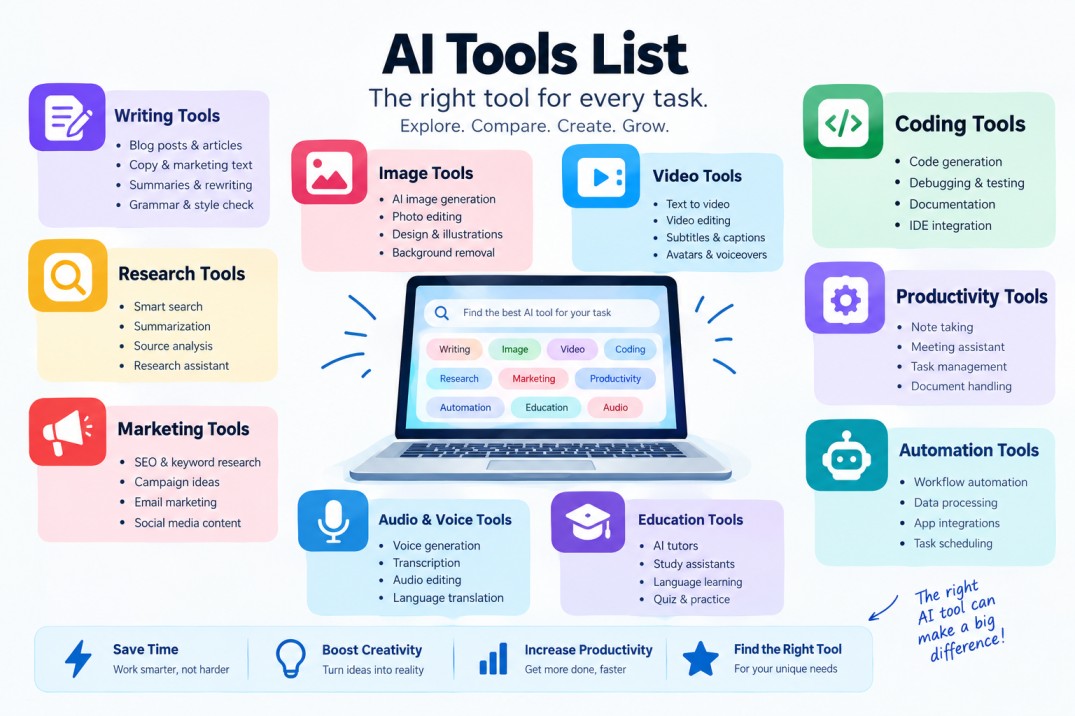
For example, an AI tools directory may include categories such as:
- AI writing tools
- AI image generators
- AI video tools
- AI coding assistants
- AI research tools
- AI productivity software
- AI marketing platforms
- AI automation tools
- AI presentation makers
- AI voice and audio tools
- AI education tools
- AI customer support platforms
- AI business solutions
The purpose of a good AI tools list is not simply to collect as many names as possible. Its real purpose is to make tool discovery easier.
Imagine that you need to create a professional presentation. You could search Google for AI presentation software, open several websites, read their features, compare pricing, create multiple accounts, and test each platform.
Or you could describe your goal to an AI tool recommendation platform and immediately explore relevant options.
That second approach can save time, reduce research, and make it easier to discover tools you may not have found through a traditional search.
Why AI Tools Are Becoming Essential
AI has changed the way people approach digital work.
Previously, many tasks required specialized technical skills or hours of manual effort. Today, intelligent software can assist with parts of those processes in seconds or minutes.
A writer can use AI to brainstorm topics and organize an outline.
A marketer can generate campaign ideas, customer segments, and draft copy.
A designer can create visual concepts from text prompts.
A developer can use AI to explain code, identify bugs, or generate implementation ideas.
A business owner can automate repetitive communication and document workflows.
A student can use AI to explain difficult concepts and create study materials.
The important point is that AI does not have to replace an entire job or workflow to be valuable. Sometimes its biggest advantage is reducing the amount of repetitive work that people have to do themselves.
This is why building a personal AI tools list can be so useful.
Instead of thinking about AI as one application, think of it as an expanding toolbox.
Different tools solve different problems.
The Main Categories in an AI Tools List
A strong AI tools list should be organized around user intent. People rarely search for “artificial intelligence software” simply because they want software. They usually have a task in mind.
Understanding these categories can help you find the right solution faster.
1. AI Writing Tools
AI writing tools are among the most widely used applications of generative AI.
They can help with blog posts, emails, product descriptions, social media captions, outlines, summaries, scripts, reports, and other forms of written communication.
Many writing platforms also provide rewriting, grammar improvement, tone adjustment, summarization, and content expansion features.
For content creators and marketers, these tools can speed up the first stages of content production.
However, the best workflow is usually not to publish raw AI-generated text without review. Human editing remains important for accuracy, originality, brand voice, and quality.
When exploring a writing tool, consider whether you need:
- Long-form content generation
- Short-form copy
- Editing and rewriting
- Grammar correction
- Brand voice control
- Content summarization
- SEO assistance
- Multilingual writing
A useful AI tools directory should help users filter writing tools based on these needs rather than presenting every option in one giant list.
2. AI Image Generators
AI image generators allow users to create visual content from text prompts or other inputs.
They are useful for concept development, marketing graphics, illustrations, social media content, creative experiments, product ideas, and visual storytelling.
The quality of AI-generated images has improved dramatically, but different platforms are designed for different purposes.
One tool may be better for artistic experimentation.
Another may focus on photorealistic images.
Another may provide advanced editing and design workflows.
When comparing image tools, pay attention to image quality, prompt control, editing capabilities, commercial usage rights, output resolution, generation speed, and available creative controls.
If your task is simply “create an image for a blog post,” you may not need a highly specialized professional platform.
If your workflow involves repeated commercial image production, more advanced features may matter considerably.
3. AI Video Tools
AI video has become one of the fastest-growing areas of generative technology.
Modern video tools can assist with text-to-video generation, video editing, avatars, voiceovers, subtitles, animation, scene creation, and content repurposing.
For creators, AI can reduce the amount of time required for tasks such as:
Creating short-form videos.
Generating scripts.
Adding captions.
Producing voiceovers.
Converting written content into visual content.
Creating presentation videos.
Localizing video content into multiple languages.
Businesses can also use AI video solutions for internal communication, training, advertisements, product demonstrations, and educational content.
Because video generation can involve more complicated workflows than text generation, the right tool depends heavily on the specific task.
That is another reason why an AI Tools Finder can be more useful than a static list: the recommendation can begin with the user’s objective rather than the tool’s brand name.
4. AI Coding Assistants
AI coding tools are increasingly important for developers and software teams.
They can generate code, explain unfamiliar codebases, suggest improvements, identify potential bugs, write tests, and assist with documentation.
Beginners can also use coding assistants as educational tools.
For example, a beginner might ask an AI system to explain why a specific function works, while an experienced developer may use AI to quickly prototype an implementation.
Still, generated code should be reviewed carefully.
AI-generated code can contain logical errors, security problems, outdated approaches, or assumptions that do not fit the project.
The best use of an AI coding assistant is usually as a development partner, not an unquestioned authority.
When reviewing coding tools in an AI tools list, useful comparison criteria include language support, IDE integration, code completion, repository awareness, debugging assistance, testing support, privacy controls, and team features.
5. AI Research Tools
Finding information online is easy.
Finding relevant, reliable, organized information is much harder.
AI research tools are designed to help users search, summarize, compare, organize, and understand large amounts of information.
They can be useful for market research, academic exploration, competitor research, business planning, product research, and general information discovery.
Research-focused AI tools often provide features such as:
Source discovery.
Document analysis.
Question answering.
Summarization.
Citation support.
Knowledge extraction.
Comparison of multiple sources.
These tools can dramatically speed up initial research, but users should still verify important claims against trustworthy primary or authoritative sources.
AI can help you find and understand information. It does not automatically make every piece of information correct.
6. AI Productivity Tools
Productivity is one of the broadest categories in the AI ecosystem.
AI productivity tools can help manage notes, meetings, calendars, documents, tasks, communication, and personal workflows.
For example, an AI productivity tool may turn a meeting transcript into action items, summarize a long document, draft an email, organize notes, or help prioritize tasks.
The real value comes from integration.
A tool that works inside the applications you already use can often be more useful than a standalone platform with more features but no convenient workflow.
When evaluating productivity software, ask:
Does it save time?
Does it reduce repetitive work?
Does it integrate with the tools I already use?
Does it require significant setup?
Does it keep my information secure?
A long feature list is less important than measurable improvements to your daily workflow.
7. AI Marketing Tools
Marketing teams can use AI at almost every stage of the customer journey.
AI marketing software can assist with content creation, keyword research, campaign brainstorming, customer segmentation, ad copy, email marketing, social content, analytics, and personalization.
For SEO professionals, AI can help with topic research, content outlines, search intent analysis, internal linking ideas, and content optimization.
But there is an important distinction between using AI to improve a process and trying to automate everything.
High-quality marketing still requires strategy, audience understanding, brand positioning, human creativity, and editorial judgment.
AI is most effective when it handles repetitive or time-consuming tasks while people focus on decisions that require context and judgment.
8. AI Automation Tools
AI automation tools connect multiple steps of a workflow.
Instead of manually copying information from one application to another, an automated workflow can trigger actions based on specific events.
For example:
A new form submission can trigger an AI-generated summary.
A customer message can be classified automatically.
A new document can be analyzed and routed to the correct team.
An incoming lead can be categorized based on predefined criteria.
A meeting transcript can be transformed into structured tasks.
AI automation becomes especially powerful when combined with traditional workflow automation.
The result is not simply “AI that generates text,” but software that can actually participate in business processes.
9. AI Voice and Audio Tools
Voice AI is another important category for creators, businesses, and developers.
AI audio tools can generate speech, transcribe conversations, clean recordings, create voiceovers, translate speech, and produce audio content.
Podcasters can use AI to assist with editing and transcription.
Businesses can create training or informational voice content.
Video creators can generate narration without recording every sentence manually.
Developers can integrate voice capabilities into applications.
When choosing an AI voice tool, factors such as pronunciation, language support, naturalness, customization, latency, and licensing can matter significantly.
10. AI Tools for Education
Education is another area where AI tools can provide practical assistance.
Students can use AI applications for explanations, brainstorming, practice questions, summaries, language learning, and study planning.
Teachers can explore AI for lesson planning, activity generation, feedback, and educational content creation.
The most useful educational workflows focus on learning rather than simply obtaining an answer.
For example, asking an AI tutor to explain a difficult concept in several different ways can be more educational than asking it to complete an assignment without understanding the reasoning.
A strong AI tools list for education should therefore consider both convenience and learning value.
How to Choose the Right AI Tool
Having access to thousands of AI applications does not automatically make decision-making easier.
In fact, too many options can create another problem: choice overload.
The simplest way to avoid this is to start with the task.
Do not begin with:
“What are the most popular AI tools?”
Begin with:
“What am I trying to accomplish?”
For example:
“I need to turn long videos into short clips.”
“I need to write product descriptions.”
“I need help understanding a spreadsheet.”
“I need to automate repetitive customer emails.”
“I need to create a presentation.”
“I need to generate images for marketing.”
Once you define the task, you can compare tools based on the features that actually matter.
This task-first approach is exactly why an AI Tools Finder can be more efficient than browsing an enormous directory manually.
How to Build Your Own AI Tools Stack
You do not need hundreds of AI applications.
A small, well-chosen stack can be much more useful.
A typical AI workflow might include one general-purpose assistant, one content tool, one research tool, one visual tool, and one automation platform.
The ideal combination depends on your work.
For a content creator, the stack could focus on writing, research, image generation, video editing, and social media.
For a software developer, it might prioritize coding assistance, documentation, debugging, testing, and project management.
For a small business, automation, customer support, marketing, sales, and analysis may matter more.
The key is to evaluate the whole workflow, not individual tools in isolation.
Sometimes one platform can replace three smaller tools. In other cases, specialized software provides better results.
A good AI tools list should help you discover these possibilities.
Common Mistakes When Choosing AI Tools
One of the biggest mistakes is selecting a tool because it is trending rather than because it solves a real problem.
Popularity does not guarantee suitability.
Another common mistake is testing too many tools without defining success criteria.
For example, if you are comparing AI writing platforms, decide what matters first:
Accuracy?
Tone?
Speed?
SEO features?
Editing?
Integrations?
Price?
Without defined criteria, every tool may seem impressive.
Another mistake is ignoring privacy.
Before uploading confidential business information, customer data, financial documents, source code, or sensitive files, review the provider’s privacy practices and data handling policies.
Finally, do not assume that AI automatically removes the need for human review.
Human oversight remains important, particularly when accuracy, compliance, reputation, or sensitive information is involved.
The Future of AI Tools
The AI tools market is evolving rapidly.
The most interesting development may not be the creation of individual tools, but the movement toward AI systems that can understand an objective and coordinate multiple actions.
Instead of opening five separate applications, users may increasingly interact with AI through task-oriented interfaces.
You might describe a goal such as:
“Create a content campaign for a new product.”
An intelligent system could potentially help with research, strategy, drafts, graphics, scheduling, analysis, and optimization across connected tools.
This does not mean specialized tools will disappear.
On the contrary, specialized software may remain essential for professional workflows. But discovery and orchestration are likely to become increasingly important.
That creates a growing need for smarter AI directories and recommendation systems.
The future of an AI tools list may therefore be less about displaying hundreds of logos and more about helping people answer a simple question:
Which AI tool should I use for this task?
Why an AI Tools Finder Can Be More Useful Than a Static Directory
Traditional directories are useful when users already know what category they need.
But many users do not know the name of the category.
They only know their problem.
They may say:
“I want to turn a PDF into a summary.”
“I need to make a professional presentation.”
“I want to create an AI voice.”
“I need to remove a background from an image.”
“I want to automate a repetitive process.”
“I need help with coding.”
That is a fundamentally different search experience.
Instead of forcing users to browse category pages, an AI tools recommendation system can start from natural language and work backward toward a solution.
This makes the discovery process more intuitive.
With an AI Tools Finder, users can explain what they want to accomplish and explore relevant AI tools based on the task itself.
For people who are new to artificial intelligence, this can remove much of the confusion surrounding dozens of unfamiliar products.
For experienced users, it can provide a faster way to discover alternatives and specialized software.
What Makes a Great AI Tools Directory?
A high-quality directory should be more than a collection of names.
It should provide useful context.
For every tool, users should ideally be able to understand:
What does it do?
What problem does it solve?
Who is it designed for?
What are its main features?
Does it offer a free plan or trial?
What type of output does it produce?
How difficult is it to use?
Does it integrate with other platforms?
Is it designed for individuals, teams, developers, or businesses?
This information transforms a generic list into a genuine discovery resource.
It also improves the user experience because visitors can make more informed decisions without opening every tool in a separate browser tab.
FAQ
What is the best AI tool?
There is no single AI tool that is ideal for every task.
A writing application, coding assistant, image generator, and automation platform solve completely different problems. The right choice depends on your specific goal, workflow, budget, technical requirements, and desired output.
The most useful starting point is to define the task first and then compare relevant tools.
How many AI tools are available?
The AI software ecosystem contains a very large and constantly changing number of tools. New applications appear frequently, while existing products are updated, rebranded, merged, or discontinued.
For that reason, a living AI tools directory can be more useful than a fixed article that lists a handful of products.
Are free AI tools good enough?
Free AI tools can be perfectly suitable for casual users, experimentation, education, and basic workflows.
Paid plans may become more valuable when you need higher usage limits, advanced functionality, team collaboration, integrations, or professional features.
Can AI tools replace human creativity?
AI tools can assist with ideation, generation, editing, and production, but human judgment remains important.
Creative quality often depends on context, taste, originality, strategy, and understanding of the audience.