
How to Create an App Using AI Without Knowing How to Code
A few years ago, creating an app usually meant learning programming, hiring a developer, or spending a significant amount of money on a development team.
Today, AI has changed that process.
You can describe an app in plain English, generate a working version, modify its design, create user flows, connect data, test features, and prepare it for launch with AI-assisted tools. Modern platforms such as Bubble, Lovable, Bolt, and Replit now support different versions of prompt-based or AI-assisted application development.
But there is an important distinction:
Building an app with AI is not the same as building an AI-powered app.
Building an app with AI means using AI as part of the development process.
For example:
- You use AI to generate the interface.
- You ask AI to create workflows.
- You describe features instead of writing code.
- You use AI to find and fix problems.
- You ask AI to improve the user experience.
An AI-powered app, on the other hand, includes AI as a feature. For example, it might contain an AI chatbot, document summarizer, recommendation engine, image analyzer, or writing assistant. These two approaches can also be combined.
The good news is that you do not need to be a programmer to start.
This guide shows you exactly how to create an app using AI, from the first idea to a usable product.
What Do You Need to Create an App Using AI?
You do not need a large development team to build your first app.
At a minimum, you need:
- An app idea
- A clear target audience
- A list of problems your app solves
- An AI app builder or AI development environment
- A way to test the result
- A domain or publishing method if you plan to launch it publicly
The most important part is not the AI tool.
It is the clarity of your idea.
An AI builder can generate an application from a description, but vague instructions usually produce vague results. Current AI app-building platforms themselves emphasize that detailed prompts, clear features, workflows, and data requirements generally produce better results.
So before opening an AI app builder, define what you actually want to build.
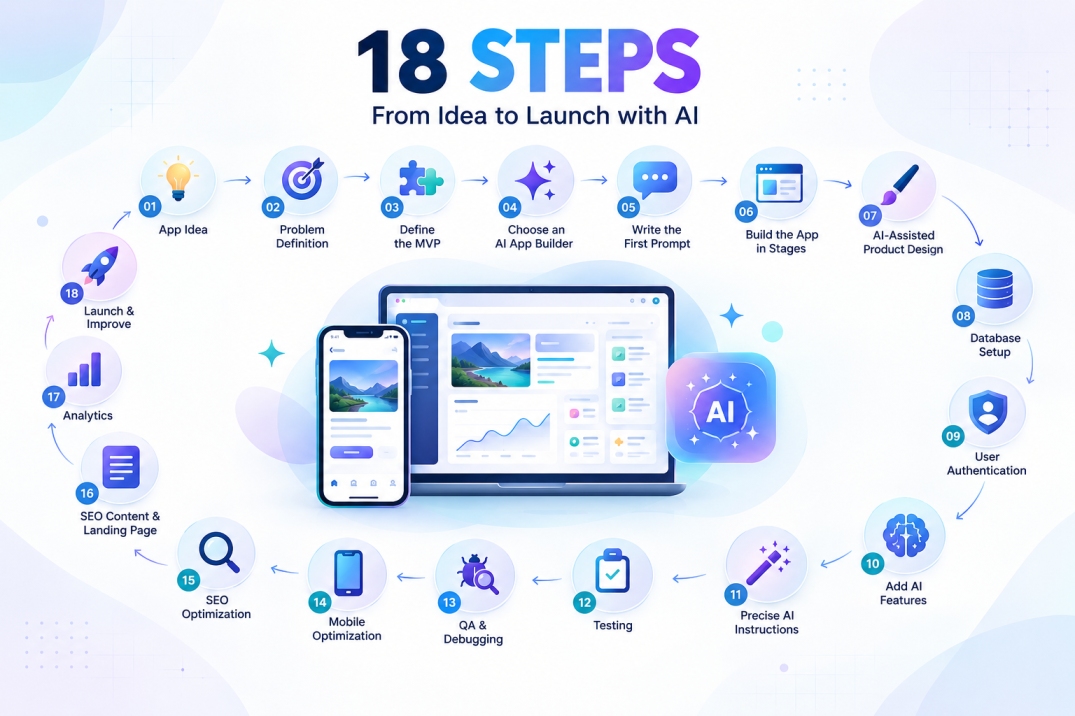
Step 1: Start With a Problem, Not an App
One of the biggest mistakes beginners make is starting with:
“I want to build an app.”
That is too broad.
Instead, start with:
“I want to solve this specific problem for this specific type of user.”
For example:
Weak idea:
I want to build a fitness app.
Better idea:
I want to build a simple fitness tracking app for busy beginners who want to record workouts in less than one minute.
The second idea immediately gives the AI more useful information.
You can define your idea using this simple formula:
Target user + problem + solution + main outcome
For example:
Busy freelancers + struggle to track invoices + simple invoice management app + get paid on time.
This becomes the foundation of your application.
Step 2: Define Your MVP
You do not need to build everything at once.
Your first version should be an MVP, or Minimum Viable Product.
An MVP contains only the features necessary to solve the main problem.
Imagine you are building a habit tracker.
You might initially need:
- User registration
- Habit creation
- Daily completion tracking
- Progress dashboard
- Basic profile settings
You probably do not need:
- Social networking
- Gamification
- AI coaching
- Complex analytics
- Multiple subscription tiers
- A community forum
- Ten different integrations
Those features can come later.
A simple rule is:
Build the smallest version that delivers the promised value.
This is especially important when using AI because AI makes it extremely easy to keep adding features.
More features do not automatically create a better product.
Step 3: Choose the Right AI App Builder
There is no single AI tool that is perfect for every project.
Your choice should depend on what you want to build.
Visual No-Code Platforms
Platforms such as Bubble focus heavily on visual development. Bubble’s current AI app builder can generate applications from natural-language descriptions and lets users visually edit the application’s interface, logic, and database without needing to work directly with code. Bubble also currently offers a native mobile builder in beta.
This type of platform can be particularly useful when you want visual control.
AI Web App Builders
Tools such as Lovable can turn natural-language descriptions into working web applications with interfaces, data, logic, authentication, and hosting. Lovable also supports mobile-friendly web applications and Progressive Web Apps (PWAs), but its mobile builder produces web apps rather than native App Store or Google Play packages.
AI Development Environments
Tools such as Bolt and Replit are designed to let users describe an application and have AI generate and modify the underlying application. Bolt provides a browser-based full-stack development environment and supports live previews and deployment. Replit similarly supports natural-language app development and can be used for websites, apps, dashboards, and other software projects.
For beginners, the practical question is not:
“Which AI tool is the most powerful?”
Instead ask:
“Which tool matches the type of app I want to launch and the amount of technical control I need?”
Step 4: Write Your First AI App Prompt
This is where many beginners go wrong.
They type:
“Build me a modern shopping app.”
That leaves too many decisions to the AI.
A better prompt explains:
- Who will use the app
- What problem it solves
- What screens it needs
- What users can do
- What data needs to be stored
- What the design should look like
- What should happen after each action
Here is a reusable prompt template.
Copy-and-Paste AI App Prompt
Create a web application for [TARGET AUDIENCE].

The main problem this app solves is:
[DESCRIBE THE PROBLEM].

The main goal of the application is:
[DESCRIBE THE DESIRED OUTCOME].

The application should include these core features:

1. [FEATURE ONE]
2. [FEATURE TWO]
3. [FEATURE THREE]
4. [FEATURE FOUR]

Create the following main screens:

- Home/Dashboard
- Login and Sign Up
- Main Feature
- User Profile
- Settings

User flow:

1. A new user creates an account.
2. The user reaches the dashboard.
3. The user can [MAIN ACTION].
4. The application saves the user's information.
5. The user can view and manage previous activity.

Design requirements:

- Clean and modern interface
- Responsive on mobile, tablet, and desktop
- Simple navigation
- Accessible typography
- Clear call-to-action buttons
- Consistent spacing
- Professional visual hierarchy

Before adding advanced features, build the core MVP.
Do not add unnecessary features.
Use clear labels and simple user flows.
Make the application easy for a first-time user to understand.
The key principle is simple:
Give AI product requirements, not just a product name.
Step 5: Ask AI to Build the App in Stages
You might be tempted to give the AI one enormous instruction containing fifty requirements.
That can create unnecessary complexity.
A better method is incremental prompting.
Start with the foundation.
Prompt 1: Build the MVP
Create the basic application using the requirements above. Focus only on the core user journey.
Then inspect the result.
Prompt 2: Improve the Interface
Improve the user interface. Make the dashboard cleaner, simplify the navigation, improve spacing, and make the primary action visually obvious.
Inspect again.
Prompt 3: Improve the User Experience
Review the application from the perspective of a first-time user. Identify confusing steps and simplify the user flow without adding unnecessary features.
Then continue with individual improvements.
This approach gives you much more control.
Step 6: Use AI as Your Product Designer
You do not have to accept the first interface AI generates.
Ask AI to explore alternatives.
For example:
Create three different dashboard layouts for this application: minimal, professional, and visually engaging. Keep the same functionality.
Then compare the layouts based on your audience and use case.
You can also ask:
Make the interface easier for users over 50 without making it look outdated.
Or:
Reduce visual clutter and make the primary task possible in fewer clicks.
Or:
Improve the mobile version without changing the application’s core functionality.
AI becomes much more useful when you treat it as an iterative design partner rather than a one-click generator.
Step 7: Build the Database Without Writing SQL
A real application usually needs data.
For example, a booking application might need:
Users
- Name
- Account status
Bookings
- Customer
- Date
- Time
- Service
- Status
Services
- Name
- Description
- Price
- Duration
You can explain the structure to AI in ordinary language.
For example:
Create a database structure for this application.

We need three main types of records:

Users:
Each user has a name, email, and account status.

Bookings:
Each booking belongs to a user and contains a date, time,
selected service, and booking status.

Services:
Each service has a name, description, price, and duration.

Make sure relationships between these records are clear
and prevent users from accessing another user's private data.
Modern AI application environments can help generate or configure database-backed functionality, authentication, and workflows, although the exact capabilities depend on the platform you use.
You should still review the result carefully.
Step 8: Add User Authentication
If your app has accounts, users usually need to:
- Sign up
- Log in
- Log out
- Reset passwords
- Manage their profiles
Instead of trying to configure everything manually, ask the AI builder:
Add secure user authentication.

Users should be able to:
- Create an account
- Log in
- Log out
- Reset their password
- Edit their profile

A user must only be able to view and modify
the data that belongs to their account.

Add appropriate validation and clear error messages.
Do not treat “AI generated” as the same thing as “secure.”
Authentication and privacy rules should be tested before real users or sensitive information are introduced.
For applications involving financial, medical, legal, or other sensitive data, professional security review may be appropriate.
Step 9: Add AI Features to Your App
Once the basic application works, you can add artificial intelligence as a feature.
For example, a productivity app could include:
- AI task suggestions
- Text summarization
- Smart categorization
- Natural-language search
- Personalized recommendations
A customer support application could include:
- AI chatbot
- Conversation summaries
- Suggested responses
- Ticket classification
A learning application could include:
- AI-generated quizzes
- Personalized explanations
- Study plans
- Writing feedback
The important principle is:
Do not add AI just because you can. Add AI when it improves the user’s outcome.
A normal search box may be better than an AI chatbot for some tasks.
Step 10: Give AI Precise Instructions for AI Features
Suppose you are creating an AI writing assistant.
Do not simply write:
Add an AI writing feature.
Define its behavior.
For example:
Add an AI writing assistant.

The user enters a draft.

The AI should provide:
1. A clearer version
2. A more professional version
3. A shorter version

The AI should preserve the original meaning.

Add a loading state while the response is being generated.

If the AI request fails, show a friendly error message
and allow the user to try again.

Do not modify the user's original draft automatically.
This creates a much clearer product requirement.
Step 11: Test Everything Before Launching
One of the most important lessons in AI app development is this:
A generated app is not automatically a finished app.
AI-generated applications still need testing and validation. Replit’s own engineering discussion emphasizes evaluating whether users can actually move through an application successfully rather than assuming that generated output is correct. Bolt likewise notes that interconnected business logic, regulated data, and complex systems may still require engineering review.
Create a simple testing checklist.
Test the main user journey
Ask:
- Can a new user register?
- Can they log in again?
- Can they complete the primary task?
- Is their data saved?
- Can they edit or delete information?
- What happens when something fails?
- Does the app work on mobile?
- What happens with an empty database?
- What happens with incorrect information?
- What happens if the user refreshes the page?
Then test unusual situations.
For example:
What happens if a user submits the form twice?
What happens if the network connection disappears?
What happens if a required field is empty?
What happens if the user enters extremely long text?
These are the situations that often separate a promising prototype from a reliable application.
Step 12: Ask AI to Find Problems
You can turn AI into a testing assistant.
Use a prompt such as:
Act as a quality assurance specialist.

Review this application as if you are testing it before launch.

Look for:
- Broken user flows
- Missing validation
- Confusing navigation
- Mobile layout problems
- Accessibility issues
- Data privacy problems
- Error-handling gaps
- Duplicate actions
- Empty states
- Loading states

For each issue:
1. Explain the problem.
2. Explain why it matters.
3. Suggest a specific fix.

Do not change unrelated parts of the application.
This is particularly useful for professional users because it creates a repeatable review process.
Step 13: Make Your AI-Built App Mobile-Friendly
A large percentage of users may access a web application from a phone.
Ask AI to test:
- Navigation
- Buttons
- Forms
- Tables
- Cards
- Modals
- Text size
- Touch targets
- Horizontal scrolling
Use a prompt like:
Audit the application for mobile usability.

Check every major screen at small smartphone widths.

Fix:
- Horizontal overflow
- Buttons that are difficult to tap
- Text that is too small
- Crowded navigation
- Tables that do not fit the screen
- Forms that require unnecessary scrolling

Keep the desktop experience intact.
Responsive behavior is an important capability of several current AI app-building platforms, but you should still manually test the final result on real devices.
Step 14: Make Your App SEO-Friendly
SEO is especially important when you are building a public web application, landing page, directory, marketplace, SaaS website, or content-driven product.
However, SEO is not simply about repeating a keyword.
Google’s current guidance emphasizes useful, reliable, people-first content, originality, clear organization, and a good page experience rather than content created primarily to manipulate rankings. Google also states that there is no preferred word count that makes content rank.
Ask your AI builder to help you implement the following:
Page Titles
Each important page should have a descriptive title.
Instead of:
Home
Use something more meaningful, such as:
Online Invoice Management for Freelancers
Meta Descriptions
Create a useful description that explains what the page offers.
Semantic HTML
Use meaningful page structures such as:
- Header
- Navigation
- Main content
- Sections
- Footer
- Appropriate headings
Some current AI development tools can generate semantic HTML structures and SEO-related files automatically, but generated SEO settings should still be reviewed rather than assumed to be correct.
Clean URLs
Use URLs that describe the content.
For example:
/features/invoice-tracking/
is generally clearer than:
/page?id=7821
Sitemap and Robots Rules
Your public pages should be configured so search engines can discover the pages you actually want indexed.
Structured Data
Where appropriate, structured data can help Google understand the type of content on a page. Google supports structured data for several content types, including articles, products, events, organizations, and software applications.
Step 15: Use AI to Create an SEO Brief for Your App
You can also use AI before writing your website content.
Try this prompt:
Act as an SEO strategist.

My application is:
[DESCRIBE YOUR APP]

Target audience:
[DESCRIBE YOUR USERS]

Main problem solved:
[DESCRIBE THE PROBLEM]

Create an SEO content plan containing:

- Primary search intent
- Main keyword theme
- Secondary keyword themes
- Homepage title
- Homepage meta description
- H1
- Suggested H2 sections
- FAQ topics
- Suggested landing pages
- Internal linking ideas

Avoid keyword stuffing.
Prioritize useful content and natural language.
This creates a foundation for your website’s organic search strategy.
Step 16: Create a Professional Landing Page
Even a great application can struggle to attract users if its landing page is weak.
Your homepage should quickly answer four questions:
What is this?
Explain the product in one sentence.
Who is it for?
Tell visitors who should use it.
What problem does it solve?
Explain the benefit instead of only listing features.
What should I do next?
Give the visitor one clear primary action.
For example:
Manage Your Freelance Invoices Without the Spreadsheet Chaos
Create invoices, track payments, and know exactly what is overdue — all from one simple dashboard.
Start Free
This is more useful than a headline like:
“The World’s Most Advanced Next-Generation Business Platform.”
Clear beats complicated.
Step 17: Add Analytics Before You Launch
You cannot improve what you do not measure.
For a new application, consider tracking actions such as:
- Sign-ups
- Logins
- First successful task
- Feature usage
- Trial starts
- Purchases
- Subscription cancellations
- Errors
Your most important metric is often related to the user’s main outcome.
For example, for a booking application, the important event may be:
Completed booking
For a learning application:
Completed lesson
For an invoice application:
Invoice sent
Do not track dozens of meaningless events simply because your analytics platform allows it.
Step 18: Launch a Small Version First
You do not need 100 features before launch.
A better approach is:
Build → Test → Launch → Learn → Improve
Release your MVP to a small group of users.
Watch what they actually do.
You may discover that the feature you thought was essential is barely used, while a small feature becomes the most valuable part of the product.
Real users provide information that AI cannot fully invent for you.
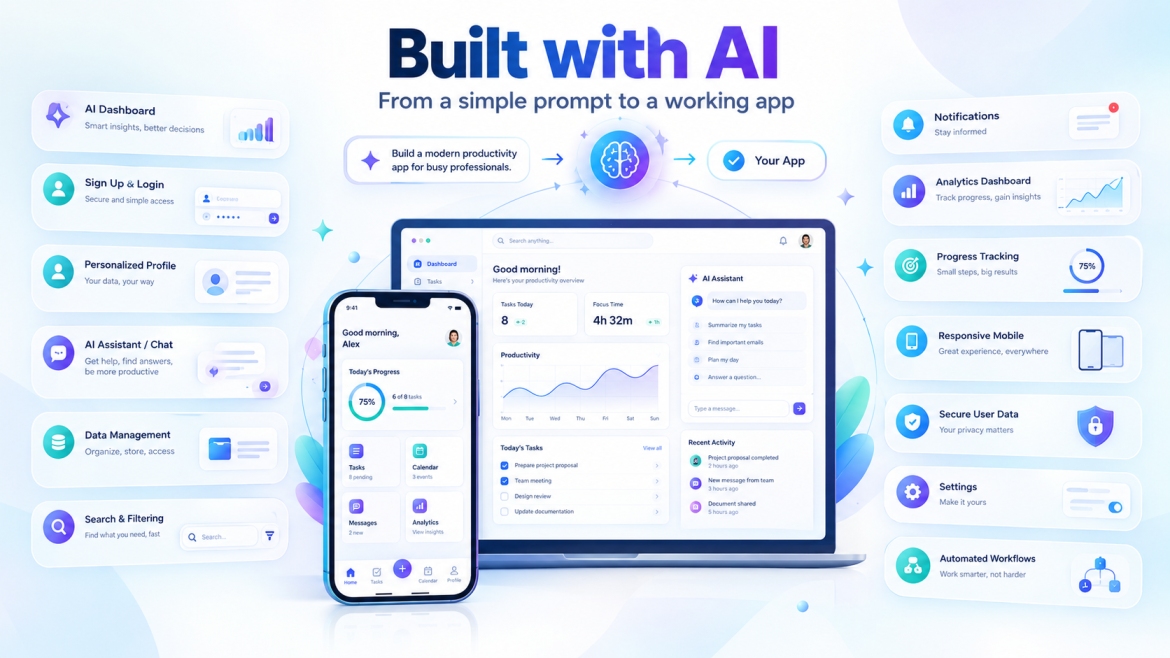
A Complete Example: Build a Habit Tracker With AI
Let’s make the process concrete.
Imagine you want to create:
A simple habit tracker for busy professionals.
Your target audience
Busy professionals who want to build consistent daily habits without complicated productivity systems.
Your core problem
Many habit apps are overloaded with features and take too much time to manage.
Your MVP
The first version will include:
- Account creation
- Habit creation
- Daily check-in
- Progress tracking
- Weekly summary
- Basic profile settings
Now give the AI this prompt:
Create a clean habit-tracking web application for busy professionals.

The main goal is to help users track a small number of daily
habits quickly and consistently.

Core features:

1. User registration and login
2. Create a habit
3. Edit and delete a habit
4. Mark a habit as completed for today
5. View daily progress
6. View weekly progress
7. View current streak
8. Manage profile settings

Dashboard requirements:

- Show today's habits first
- Show completion progress
- Show current streaks
- Make the "complete habit" action obvious
- Keep the dashboard visually clean

Design:

- Modern
- Minimal
- Professional
- Mobile-friendly
- Accessible
- Easy to understand for a first-time user

Database:

Each user can have multiple habits.
Each habit belongs to exactly one user.
Each habit should have a name, frequency, creation date,
and completion history.

Privacy:

Users must only see their own habits and completion data.

Build only the MVP.
Do not add social features, payments, chat,
leaderboards, or unnecessary integrations yet.
At this point, you have given AI enough information to begin building the product.
But you are not finished.
The Second Prompt: Improve the Dashboard
After the first version is generated:
Improve the dashboard UX.

The primary action is marking today's habit as complete.

Make that action immediately visible.

Reduce unnecessary information above the fold.

Show progress in a simple visual format.

Make the dashboard comfortable to use on a smartphone.

Do not change the database structure.
Do not add new features.
The Third Prompt: Test the App
Test the complete habit-tracking user journey.

Check:

1. New user registration
2. Login
3. Creating a habit
4. Editing a habit
5. Completing a habit
6. Refreshing the page
7. Viewing the weekly progress
8. Logging out
9. Logging in as another user

Pay special attention to data isolation.

A user must never see another user's habits
or completion history.

List any problems you find before making changes.
The Fourth Prompt: Prepare the App for Launch
Prepare this application for production launch.

Review:

- User experience
- Mobile responsiveness
- Accessibility
- Form validation
- Error messages
- Loading states
- Empty states
- Authentication
- Data privacy
- SEO for public pages
- Page titles
- Meta descriptions
- Open Graph metadata
- Sitemap
- Robots rules

Do not introduce new product features.

Create a launch checklist containing anything
that still requires human verification.
This process is much more reliable than saying:
“Build a perfect app.”
How Professionals Can Use AI App Builders
AI app builders are not only for beginners.
Experienced product managers, designers, marketers, founders, and developers can use AI throughout the product development lifecycle.
For professionals, AI can help with:
Rapid prototyping
Turn a product concept into an interactive prototype before investing heavily in engineering.
Design exploration
Generate alternative interfaces and user flows.
Documentation
Convert product requirements into structured specifications.
Testing
Generate edge cases and QA scenarios.
Debugging
Explain errors and suggest potential fixes.
Internal tools
Create dashboards, calculators, workflow tools, and business utilities quickly.
MVP development
Validate a business idea before building a larger technical system.
The main difference is that professionals generally need stronger review processes, especially when the app contains complicated business rules, integrations, security requirements, or sensitive data. AI can accelerate development, but it does not eliminate the need for technical judgment in complex systems.
A Better Prompting Strategy: Think Like a Product Manager
The most valuable skill in AI app development is not memorizing technical commands.
It is learning how to describe what should happen.
Instead of:
Make this page better.
Say:
The primary user goal is to submit an order. The current page has too many competing actions. Reduce visual distractions, move the main action above the fold, make secondary actions less prominent, and keep all existing functionality.
Instead of:
Fix the login.
Say:
The login form should prevent submission when the email field is empty, show a clear validation message, display a loading state during authentication, and show a friendly error when authentication fails.
Instead of:
Make it mobile-friendly.
Say:
On screens below 768px, convert the horizontal navigation into a compact mobile navigation, stack the form fields vertically, prevent horizontal overflow, and ensure primary buttons are easy to tap.
The more clearly you define the desired behavior, the less the AI has to guess.
The Master Prompt for Creating an App Using AI
You can save this template and reuse it for future projects.
You are helping me build a real application.

APP IDEA:
[DESCRIBE THE APP]

TARGET USERS:
[DESCRIBE THE TARGET AUDIENCE]

PROBLEM:
[DESCRIBE THE PROBLEM]

MAIN OUTCOME:
[DESCRIBE WHAT SUCCESS LOOKS LIKE]

MVP FEATURES:
1. [FEATURE]
2. [FEATURE]
3. [FEATURE]
4. [FEATURE]

USER FLOW:
1. [STEP]
2. [STEP]
3. [STEP]
4. [STEP]

PAGES/SCREENS:
- [PAGE]
- [PAGE]
- [PAGE]
- [PAGE]

DATA:
Describe what information needs to be stored
and how different records relate to each other.

DESIGN:
- Clean
- Modern
- Responsive
- Accessible
- Consistent
- Professional

SECURITY:
Users must only access data they are authorized to access.
Validate user inputs and handle errors safely.

SEO:
For public web pages, use descriptive titles,
logical headings, useful meta descriptions,
clean URLs, semantic structure,
and appropriate indexability settings.

PERFORMANCE:
Avoid unnecessary complexity.
Keep the interface responsive.
Use sensible loading and error states.

IMPORTANT:
Build the MVP first.
Do not invent unnecessary features.
Ask for clarification only when a requirement
cannot reasonably be inferred.
After each major change, explain what changed
and identify anything that still needs testing.
Can You Really Create an App Without Coding?
Yes, for many types of applications you can build a useful first version without personally writing code.
Current AI platforms increasingly support natural-language development and visual editing. Bubble, for example, allows users to generate and visually modify applications without directly writing code, while Lovable explicitly supports building through conversation and a visual preview. Replit and similar agentic environments can also generate and modify application projects from natural-language instructions.
However, “no coding” does not mean “no thinking.”
You still need to understand:
- What your customers need
- What your app should do
- Which data it stores
- How users move through the application
- What can go wrong
- What needs to be tested
- What privacy and security requirements apply
AI can produce implementation.
You provide the product judgment.
How Long Does It Take to Create an App With AI?
A first working prototype can often be created very quickly, and several current AI app-building platforms advertise generation or deployment in minutes.
But there is a major difference between:
A prototype
and
A production-ready application.
A prototype might demonstrate the concept.
A real product may also require:
- Reliable data handling
- Authentication
- Error handling
- Security controls
- Testing
- Analytics
- Performance improvements
- Payment systems
- Email systems
- Privacy documentation
- Support processes
- Monitoring
- Backups
- Ongoing maintenance
So the important question is not:
“How fast can AI generate my app?”
It is:
“How fast can I validate and deliver a useful product safely?”
Final Checklist: Before You Launch
Use this checklist before making your AI-built app public.
Product
- Is the target audience clearly defined?
- Does the app solve one clear problem?
- Is the primary user journey easy to understand?
- Have unnecessary features been removed?
Design
- Does it look professional?
- Is the navigation clear?
- Does it work on mobile?
- Are error and loading states understandable?
- Is the interface accessible?
Functionality
- Does registration work?
- Does login work?
- Are forms validated?
- Is data saved correctly?
- Can users edit and delete information?
- Have edge cases been tested?
Security
- Can users access only authorized data?
- Are sensitive credentials protected?
- Are third-party integrations configured safely?
- Have security-critical features been reviewed?
SEO
- Does every important public page have a descriptive title?
- Is the main heading clear?
- Are meta descriptions useful?
- Are URLs readable?
- Can search engines discover the pages?
- Are sitemap and robots settings correct?
- Is structured data appropriate for the page?
Google provides Search Console and other Search Central tools to monitor indexing and search visibility, while structured data can help Google understand supported content types when implemented according to its guidelines.
Launch
- Have real users tested the app?
- Is analytics configured?
- Is a custom domain connected when needed?
- Is there a way to collect user feedback?
- Do you have a plan for fixing bugs after launch?
FAQ
Can I create an app using AI without knowing programming?
Yes. Many current AI app builders allow people to create applications using natural-language instructions and visual interfaces. The amount of technical knowledge required depends on the complexity of the application and the platform being used.
What is the easiest way to create an app with AI?
For a beginner, a visual or no-code AI builder can reduce technical complexity. The best workflow is usually to define the MVP, describe it clearly, generate a first version, test it, and improve it through small iterations.
Can AI build a mobile app?
Yes, but “mobile app” can mean different things. Some platforms generate responsive web apps or PWAs, while other platforms now support native mobile application workflows. Check whether your chosen platform produces the type of iOS or Android application you actually need before starting.
Can I create an AI-powered app without coding?
In many cases, yes. AI builders can help you add AI-powered workflows such as chat, summarization, classification, recommendations, or content generation. However, you still need to define the AI feature, control what data it can access, and test its output.
Conclusion:
Creating an app using AI is no longer limited to experienced programmers.
A beginner can start with an idea, describe the problem in plain language, generate an MVP, refine the interface, test the user journey, and eventually launch a real product.
A professional can go further by using AI for prototyping, product design, documentation, testing, debugging, internal tools, and rapid validation.
But the biggest advantage of AI is not that it removes every technical challenge.
It is that it dramatically reduces the distance between an idea and something you can actually test.
The winning workflow is simple:
Define the problem → plan the MVP → choose the right AI builder → write a precise prompt → build in stages → test everything → improve the UX → secure the application → optimize for search → launch → learn from real users.
You do not need to start by learning how to code.
Start by learning how to describe a useful product.
That is the foundation of creating an app using AI.