
Artificial intelligence tools have become part of everyday work.
You can write with AI, research faster, generate images, analyze documents, build workflows, write code, create presentations, and automate repetitive tasks—often without paying anything.
But eventually, many users hit the same question:
Is upgrading to a paid AI plan actually worth the money?
The answer is not simply “yes” or “no.”
A paid AI subscription is worth it when the additional capabilities create more value than the monthly cost. If a premium plan saves you hours, improves the quality of your work, helps you earn more money, or unlocks a workflow you cannot realistically perform with a free plan, upgrading may make sense.
On the other hand, paying for five different AI subscriptions just because each one has an impressive feature can quickly become an expensive habit.
This guide explains how to compare free vs. paid AI tools, calculate whether an upgrade has a positive return on investment, avoid subscription waste, and decide which users actually benefit from premium AI plans.
If you’re still exploring the AI ecosystem, you can also use our AI Tool Finder to discover and compare AI tools based on what you want to accomplish.
Upgrade to a paid AI tool when the free tier’s limitations directly cost you time, quality, or money at a rate higher than the subscription price. If you’re using a tool occasionally, for low-stakes tasks, or are still exploring whether it fits your workflow, the free tier is usually the smarter choice.
That single rule resolves most upgrade decisions. The rest of this article unpacks the specifics — usage limits, output quality, context windows, commercial rights, and support — so you can apply it to your exact situation.
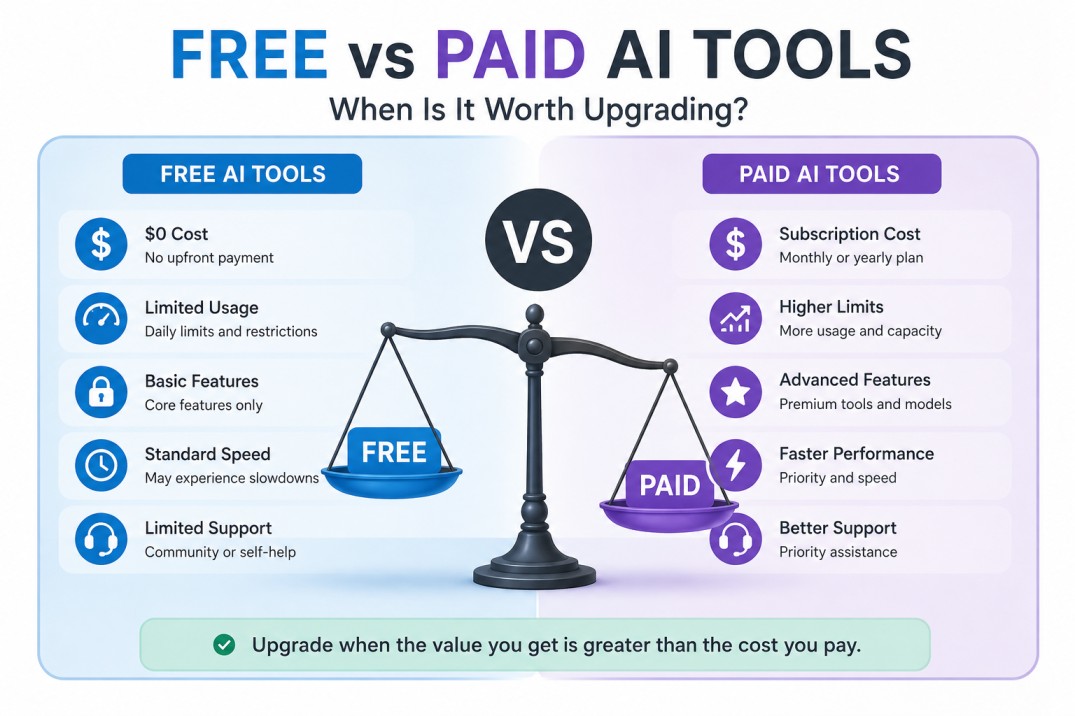
Free vs. Paid AI Tools: The Core Difference
Free and paid AI plans usually use the same basic product ecosystem, but access differs in several important ways.
| Feature | Free AI Plans | Paid AI Plans |
|---|---|---|
| Cost | $0 | Monthly or annual subscription |
| Usage limits | Usually limited | Higher or expanded limits |
| Model access | Often restricted | More advanced models or features |
| Speed | Standard or lower priority | Often faster or priority access |
| File uploads | Limited | Larger files or more usage |
| Advanced tools | Sometimes unavailable | Usually included |
| Automation | Basic or restricted | More integrations and capacity |
| Support | Limited | Better support in some services |
| Commercial workflows | Possible, but limited | Often more practical at scale |
| Reliability for heavy use | Can be inconsistent during limits | Better suited to regular use |
However, the exact differences depend on the tool.
A free plan may be extremely powerful for occasional use. A paid plan may be unnecessary unless you are using the tool professionally or at a high volume.
This is why you should compare your workflow, not just the pricing page.
What Do You Actually Get When You Pay for AI?
Paid AI plans generally sell one or more of four things:
1. More Intelligence
Premium users may gain access to stronger models, better reasoning capabilities, deeper research features, or more advanced generation quality.
This can matter for:
- Complex research
- Programming
- Data analysis
- Long documents
- Business strategy
- Advanced writing
- Multi-step tasks
But stronger AI is not always necessary.
If you only use AI to summarize emails, generate social media ideas, or improve grammar, a premium reasoning model may provide little additional value.
The key question:
Does better output materially change your results?
If the answer is no, upgrading may not be worth it.
2. More Usage
This is one of the most common reasons people upgrade.
Free users may encounter:
- Daily message limits
- File upload restrictions
- Image generation limits
- Lower automation capacity
- API restrictions
- Smaller context windows
For occasional users, these limits may never matter.
For professionals using AI every day, however, usage restrictions can interrupt work.
Imagine that an AI tool saves you 30 minutes every day—but you constantly reach the free limit halfway through your workflow.
In that case, paying for more access may have a direct productivity benefit.
3. More Tools
Premium plans increasingly offer more than a chatbot.
Depending on the platform, paid access may include:
- Advanced research
- File analysis
- Data analysis
- Image generation
- Custom assistants
- Projects and workspaces
- Integrations
- Automation
- API access
- Team collaboration
- Extended memory or context
The important question is not:
“How many extra features do I get?”
Instead, ask:
“Which of these features will I actually use?”
A plan with 30 additional features has little value if you only use one basic chat window.
4. More Reliability
Free AI services can sometimes experience:
- Usage caps
- Queue delays
- Temporary restrictions
- Limited access during high demand
For casual users, this may be inconvenient.
For someone running a business workflow, producing client work, or using AI as part of a daily operation, reliability can have real financial value.
If AI downtime delays a project, client deliverable, or revenue-generating workflow, a premium plan may be easier to justify.
Free vs. Paid AI Tools: A Decision Table
Use this table as a quick reference.
| Your Situation | Free Plan | Paid Plan |
|---|---|---|
| Learning AI | Recommended | Usually unnecessary |
| Occasional writing | Usually enough | Optional |
| Daily professional use | May become limiting | Often worthwhile |
| Freelance client work | Good for testing | Often valuable |
| Large files and complex analysis | May be restrictive | Often useful |
| AI automation | Good for experimentation | Better for production |
| Content business | Good starting point | Useful with consistent workflow |
| Software development | Depends on usage | Valuable for heavy use |
| Small budget | Start free | Upgrade only with clear ROI |
| Multiple unused subscriptions | Consolidate first | Avoid adding more |
The Hidden Cost of Paid AI: Subscription Creep
One of the biggest problems in the AI industry is subscription stacking.
A user might pay for:
- One chatbot
- One image generator
- One video generator
- One writing assistant
- One research tool
- One automation platform
- One coding assistant
Individually, each subscription may seem affordable.
Together, they might cost hundreds of dollars every month.
This creates an important question:
Do I need all these tools, or do I just like having access to them?
A useful approach is to create an AI subscription audit.
Make a list:
| Tool | Monthly Cost | Times Used This Month | Measurable Value | Keep? |
|---|---|---|---|---|
| AI Tool A | $20 | 40 | High | Yes |
| AI Tool B | $15 | 3 | Low | Maybe |
| AI Tool C | $30 | 0 | None | Cancel |
This simple exercise can reveal expensive software you no longer need.
A Practical Framework for Deciding
Rather than upgrading reactively when a tool nags you, run this quick check before you pay for anything:
1. Frequency test How often do you actually use this tool? Daily or multiple times a week strengthens the case to pay. Occasional or exploratory use rarely justifies it.
2. Friction test Are the free tier’s limits actively slowing you down — usage caps, shorter memory, lower-resolution outputs — or are they cosmetic annoyances you barely notice?
3. Stakes test Is the output going to a client, a paying audience, or a public-facing product? Higher stakes increase the value of consistency, commercial rights, and quality.
4. Substitution test Could a different free tool, or a combination of two free tools, do what this one paid tool does? Sometimes the answer to “should I upgrade” is actually “should I switch.”
5. Trial test Have you tried the paid tier for at least two to four weeks of real use, not just a quick test? Short trials often overweight novelty and underweight whether the extra capability actually changes your output.
If a tool clears three or more of these five checks, upgrading is usually a low-regret decision. If it clears one or none, the free tier is doing its job.
Common Mistakes When Paying for AI Tools
Mistake1: Paying for features you never use
A pricing page can make every feature sound essential.
Most users only need a small percentage of them.
Mistake2: Upgrading too early
Learn the free version first.
You may discover that it already solves your problem.
Mistake3: Keeping subscriptions after the project ends
Maybe you needed a premium AI tool for:
- A course
- A product launch
- A coding project
- A content sprint
Once the project ends, review whether the subscription still provides value.
Mistake4: Using expensive AI for simple tasks
Do not use your most powerful model to generate:
“Write a polite reply to this email.”
Match the tool to the task.
Mistake5: Confusing AI activity with productivity
Generating 100 ideas does not necessarily create value.
Creating 50 drafts does not mean you published useful work.
AI can increase output dramatically.Your job is to make sure it increases useful output.
FAQ
Is a paid AI tool always better quality than the free version?
Not always, and rarely by the margin marketing suggests. In many cases, the free tier runs an older or smaller version of the same underlying model, so you get consistent behavior, just less powerful. For simple tasks — basic summaries, straightforward Q&A, simple image edits — the quality gap is often unnoticeable. The gap widens noticeably on tasks needing nuance, long context, multi-step reasoning, or creative range.
How do I know if I’ve outgrown the free tier?
Look for three signals: you’re hitting usage caps regularly (more than once a week), you’re spending time working around limitations (re-uploading files, re-explaining context, waiting out cooldowns), or the task has moved from personal/experimental to something tied to income or deadlines. Any one of these is a reasonable trigger to test the paid tier for a month.
Are free AI tools safe to use for business or client work?
This depends entirely on the provider’s terms of service, not on price. Some free tiers explicitly prohibit commercial use or reserve rights to use your inputs for training. Before using any AI tool — free or paid — for client deliverables, check the terms around data usage, output ownership, and commercial licensing. Many providers reserve stronger IP and privacy protections for paid subscribers specifically because those protections cost them more to guarantee.
Do paid AI tools use my data differently than free ones?
Often, yes. It’s common for free tiers to use conversations or uploads to help improve the underlying model, while paid business or enterprise tiers offer options to opt out of training use, along with stronger data retention and privacy controls. If data privacy matters for your use case — legal documents, proprietary code, unpublished creative work — read the specific tool’s privacy policy rather than assuming based on price alone.
Is it worth paying for multiple AI tools at once, or should I pick one?
This depends on how specialized your workflow is. A single paid general-purpose assistant can cover a lot of ground, but specialized tools (a dedicated image generator, a dedicated coding assistant, a dedicated transcription tool) often outperform a generalist at their specific task. Rather than guessing, map your actual weekly tasks first, then check which ones a single tool covers well versus which need a specialist. Our AI Tool Finder is built exactly for this — you describe your use case and it matches you to tools worth testing, free or paid, based on what you actually need.
Can I switch back to free after upgrading if it’s not worth it?
Almost always, yes. Most AI subscriptions are month-to-month with no long-term lock-in, and downgrading typically takes effect at the end of your billing cycle. This makes a low-risk one-month trial a reasonable way to test whether a paid tier earns its cost, rather than committing to an annual plan upfront.
What’s the real cost of “free” if there’s no subscription fee?
Three things: time, data, and opportunity cost. Time spent working around limitations, restarting conversations, or re-explaining context has a real cost even without a bill attached. Data refers to how your inputs may be used to train models on the free tier. Opportunity cost is the output quality or speed you’re leaving on the table — which matters more the more that output is tied to revenue.
How much should I expect to pay for a “worth it” AI subscription?
Most individual-tier AI tools land between $10–$30/month, with power-user or professional tiers running $50–$200/month. The “worth it” threshold isn’t the price tag itself — it’s whether the tool saves or earns you more than that amount in time or output value each month. A $20/month tool that saves two hours of work at any reasonable hourly rate has already paid for itself.