
What Is an AI Meeting Note Taker?
An AI meeting note taker is software that uses artificial intelligence to capture, transcribe, summarize, and organize information from meetings. Instead of requiring someone to manually write notes throughout a conversation, an AI meeting note taker can turn spoken discussions into searchable transcripts, concise summaries, decisions, and action items.
Modern AI meeting note takers are particularly useful for sales calls, team meetings, interviews, project discussions, customer conversations, online conferences, and one-to-one meetings.
The basic workflow is straightforward:
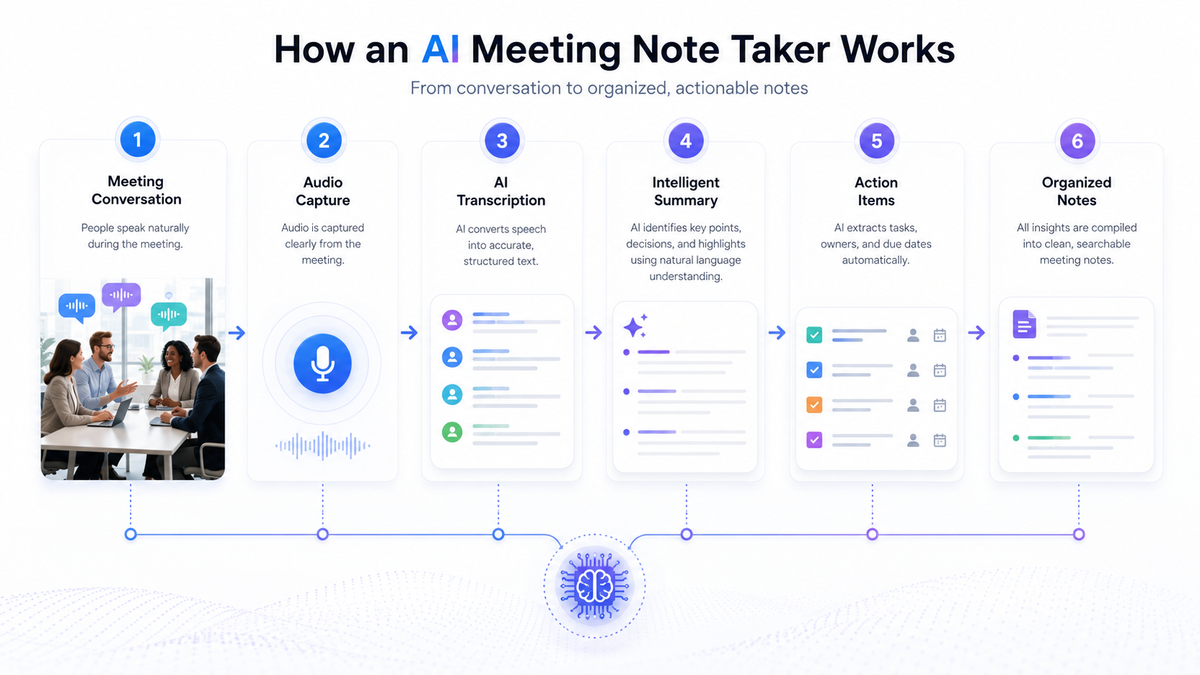
Meeting → Audio → Transcription → AI analysis → Summary → Decisions and action items
The main value is not simply creating a transcript. A useful AI meeting assistant converts a long conversation into structured information that people can act on.
How Does an AI Meeting Note Taker Work?
AI note takers typically operate through four stages:
- Audio Capture — The tool joins the call as a bot participant or integrates via a browser extension/desktop app to record audio (and sometimes video) in real time.
- Transcription — Speech-to-text models convert spoken audio into a written transcript, often with 90–98% accuracy depending on audio quality, accents, and background noise.
- Speaker Diarization — The system identifies who said what, labeling each speaker in the transcript.
- Summarization & Extraction — A large language model (LLM) processes the transcript to generate a concise summary, extract action items, highlight decisions, and sometimes generate follow-up emails.
The result is delivered as a dashboard entry, a shared document, or a message pushed directly into your team’s chat or task management tool.
Why Use an AI Meeting Note Taker?
The biggest advantage is reducing the amount of manual work required to document meetings.
Traditional note-taking forces participants to divide their attention between listening and writing. This can make it harder to contribute to the conversation, recognize important context, or ask useful questions.
An AI meeting note taker can handle much of the documentation while participants focus on the discussion.
Key benefits include:
- Automated meeting transcription
- Faster creation of meeting summaries
- Easier identification of action items
- Searchable historical conversations
- Better follow-up after meetings
- Reduced administrative work
- More consistent documentation
- Easier information sharing
- Greater accessibility for people who cannot take detailed notes
- Improved organizational knowledge management
However, AI-generated notes should be treated as an assistive technology, not an unquestionable record. Important decisions, names, numbers, deadlines, and commitments should be reviewed by a human.
What Can an AI Meeting Note Taker Record?
Depending on the software, an AI meeting assistant may capture several different types of information.
1. Transcripts
A transcript provides a written version of the conversation. Transcripts are useful when someone needs to verify exactly what was discussed or search for a specific statement.
2. Summaries
AI can condense a 30-, 60-, or 90-minute meeting into a much shorter overview.
A useful summary should prioritize information such as:
- What was discussed
- What changed
- What was decided
- What remains unresolved
- What needs to happen next
3. Action Items
One of the most valuable functions is identifying tasks that emerged during the conversation.
For example:
| Meeting discussion | Extracted action |
|---|---|
| Website launch discussed | Marketing team to finalize launch assets |
| Customer reported onboarding issue | Product team to investigate issue |
| Budget requires approval | Finance lead to review proposed budget |
| Proposal needs revisions | Sales representative to update proposal |
Good systems may also identify the responsible person and deadline when these are explicitly mentioned.
4. Decisions
AI can identify statements that represent decisions, helping teams distinguish between general discussion and actual outcomes.
5. Topics and Highlights
Long meetings can be divided into topics or chapters, allowing users to navigate directly to relevant sections.

What Features Should I Look for in an AI Meeting Note Taker?
Not all tools are built the same. Here’s a breakdown of the features that matter most, organized by use case.
| Feature | Why It Matters | Good For |
|---|---|---|
| Multi-platform support (Zoom, Meet, Teams) | Avoids being locked into one video tool | Teams using multiple platforms |
| Speaker identification | Makes transcripts usable in group discussions | Larger meetings, panels |
| Custom summary templates | Tailors output for sales calls, standups, interviews, etc. | Sales, recruiting, product teams |
| CRM/PM integrations | Pushes notes and tasks into existing workflows | Sales and operations teams |
| Multilingual transcription | Supports global or non-English-speaking teams | International companies |
| Data privacy controls | Ensures compliance with GDPR, SOC 2, HIPAA, etc. | Regulated industries (finance, healthcare, legal) |
| Searchable meeting library | Lets you find quotes or decisions across past meetings | Teams with high meeting volume |
| AI Q&A on transcripts | Lets you “ask” your meeting history questions | Managers, researchers |
| Offline/in-person recording | Captures notes without needing a video call bot | Hybrid or on-site teams |
How Do You Choose the Best AI Meeting Note Taker?
There is no single best tool for every organization.
The right choice depends on your meeting volume, team size, budget, privacy requirements, integrations, and desired workflow.
AI Meeting Note Taker Evaluation Checklist
| Criterion | Questions to ask |
|---|---|
| Accuracy | How well does it handle real-world conversations? |
| Languages | Does it support the languages your team uses? |
| Speaker recognition | Can it distinguish speakers? |
| Summaries | Are summaries actionable and configurable? |
| Action items | Can it identify owners and deadlines? |
| Search | Can users find information across old meetings? |
| Integrations | Does it fit existing workflows? |
| Security | What security controls are available? |
| Privacy | How is meeting data handled? |
| Retention | Can administrators control retention? |
| Administration | Can organizations manage users and permissions? |
| Cost | Does pricing make sense at your meeting volume? |
| Usability | Can employees adopt it without extensive training? |
AI Meeting Note Taker for Small Businesses
Small businesses can benefit from AI meeting tools because administrative time is particularly valuable when teams are small.
A founder, consultant, salesperson, or project manager may simultaneously handle sales, operations, customer support, administration, and strategy.
Automating meeting documentation can reduce repetitive work without requiring a dedicated administrative resource.
For small businesses, the most important considerations are usually:
- Ease of use
- Cost
- Meeting-platform compatibility
- Summary quality
- Search
- Privacy
- Integration with existing tools
AI Meeting Note Taker for Enterprise Teams
Enterprise organizations generally have more complex requirements.
In addition to transcription and summaries, enterprise buyers may need:
- Centralized administration
- Role-based permissions
- Security controls
- Data-retention policies
- Audit capabilities
- Integration with enterprise systems
- Governance policies
- Compliance support
- Scalable deployment
At enterprise scale, the question becomes less about Can this tool take notes? and more about Can this tool safely become part of our organizational information infrastructure?
How to Build a Better Meeting Documentation System
An AI meeting note taker is most effective when it is part of a broader meeting workflow.
A useful system can follow this process:
Before the meeting
- Define the objective
- Prepare the agenda
- Identify required participants
- Determine whether recording or transcription is appropriate
During the meeting
- Keep discussion focused
- State decisions clearly
- Assign responsibilities
- Establish deadlines
- Confirm important information
After the meeting
- Review AI-generated notes
- Correct errors
- Confirm action items
- Share the final summary
- Move tasks into the appropriate workflow system
- Store important decisions where the team can find them
This approach transforms AI from a passive transcription tool into a practical productivity system.
FAQ
What is an AI meeting note taker?
An AI meeting note taker is software that uses artificial intelligence to capture conversations, generate transcripts, summarize discussions, and identify important information such as decisions and action items.
What is the best AI meeting note taker?
The best AI meeting note taker depends on your requirements. Compare transcription accuracy, summary quality, integrations, security, privacy, supported languages, administration features, and price before choosing a solution.
Are AI meeting note takers free?
Some services offer free plans or limited functionality, while others use subscription pricing. Features and usage limits vary, so pricing should be evaluated alongside transcription volume and required capabilities.
Can an AI meeting note taker work with video meetings?
Many AI meeting assistants are designed to work with online video meetings. Compatibility varies by product and meeting platform.
Can AI meeting notes replace manual notes?
For many routine meetings, AI can significantly reduce manual note-taking. However, important meetings should still receive human review because AI can make transcription and interpretation errors.
Can AI meeting assistants summarize a one-hour meeting?
Yes. AI summarization can condense lengthy conversations into shorter summaries containing key points, decisions, and action items. The quality depends on the underlying transcription and AI system.
Can AI identify who said what?
Many meeting transcription systems support speaker identification. Accuracy can vary when people speak simultaneously or when audio quality is poor.
Are AI meeting notes accurate?
They can be highly useful but are not guaranteed to be perfect. Important information such as financial figures, names, deadlines, legal statements, and final decisions should be checked.
Are AI meeting note takers secure?
Security varies between providers. Organizations should investigate encryption, access controls, data retention, storage locations, deletion mechanisms, and data-use policies before adopting a tool.
Do AI meeting note takers record audio?
Some do, while others may process meeting audio through different mechanisms. Users should check the specific product’s recording and data-processing policies.
Can AI meeting notes improve productivity?
Yes. They can reduce manual documentation, accelerate follow-up, make previous discussions searchable, and help teams convert conversations into actionable tasks.
Can AI meeting notes be searched later?
Many modern systems provide searchable transcripts or meeting libraries. Search capability can make historical meetings much more valuable as organizational knowledge.
Who benefits most from AI meeting note takers?
Sales teams, managers, consultants, recruiters, customer-success teams, project managers, founders, researchers, and distributed teams can all benefit from automated meeting documentation.