
AI personal assistants are becoming practical tools for managing information, tasks, communication, planning, research, and everyday decisions. Unlike traditional digital assistants that mainly respond to predefined commands, modern AI assistants can understand natural language, work with context, summarize information, generate content, organize ideas, and help users complete multi-step tasks.
For professionals, entrepreneurs, students, creators, and busy individuals, an AI personal assistant can function as a flexible productivity layer between a person and the information they need to manage every day.
This guide answers the most common questions about AI personal assistants, explains what they can and cannot do, compares common use cases, and provides a practical framework for getting more value from AI.
What Is an AI Personal Assistant?
An AI personal assistant is software that uses artificial intelligence to understand requests and help a person complete tasks, find information, create content, make plans, and organize work.
Unlike conventional software menus, an AI personal assistant generally allows users to communicate through natural language. Instead of learning a complicated interface, you can describe what you need.
The core difference from older “voice assistants” like the original Siri or Alexa is reasoning depth. Older assistants matched commands to pre-built scripts. Modern AI assistants can reason through multi-step problems, adapt to unfamiliar requests, and generate original content rather than pulling from a fixed response bank.
How Does an AI Personal Assistant Work?
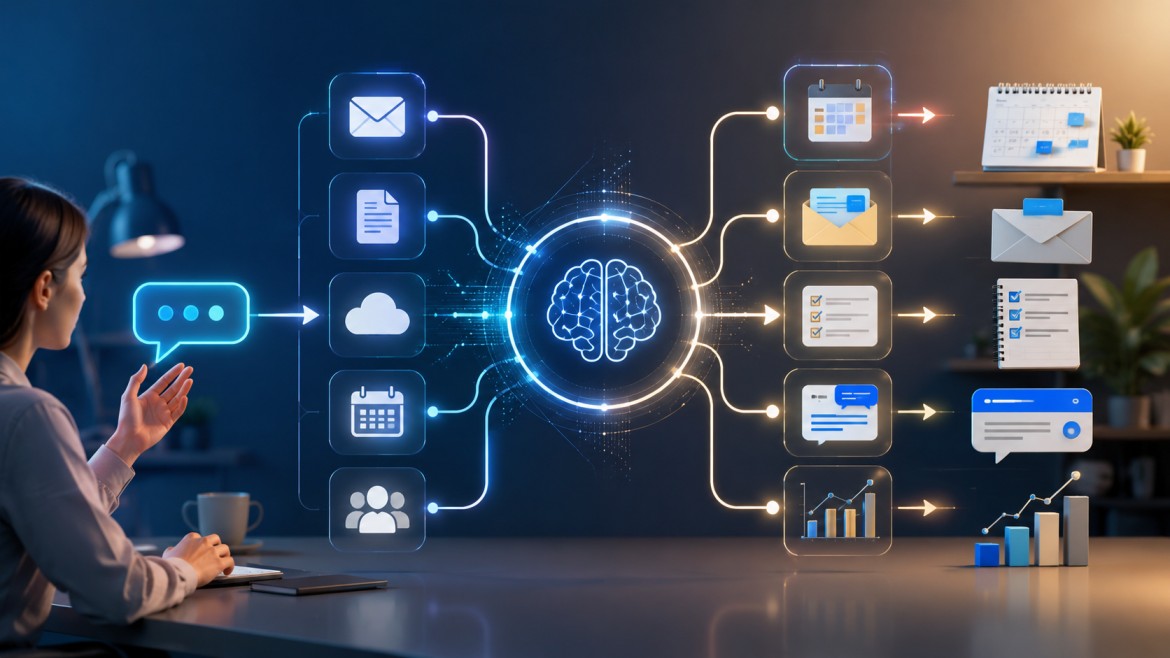
An AI personal assistant typically combines a large language model or another AI model with instructions, context, data, and software integrations.
At a high level, the process looks like this:
User request → AI interpretation → Context retrieval → Reasoning or generation → Tool/action execution → Response
The exact architecture differs between products, but most useful AI assistants depend on several capabilities.
Natural-language understanding
The assistant interprets ordinary language rather than requiring rigid commands.
You can write:
“Remind me what I need to finish before Friday and help me decide what should come first.”
The system attempts to infer the tasks, priorities, timing, and desired output.
Context awareness
Context allows the assistant to produce more relevant answers.
Context may include the current conversation, instructions, supplied documents, previous information, or connected application data.
Content generation
AI can generate or transform text, such as emails, reports, summaries, agendas, checklists, social posts, outlines, and explanations.
Information processing
An AI assistant can analyze large amounts of text and convert unstructured information into structured outputs.
Tool use and integrations
Some AI assistants can use external tools to search information, access calendars, handle files, calculate values, retrieve records, or perform other actions.
This is particularly important because an assistant becomes more useful when it can move from answering to helping execute.
What’s the difference between an AI assistant, a chatbot, and an AI agent?
These three terms get used interchangeably, but they describe different levels of capability:
| Term | What it does | Example behavior |
|---|---|---|
| Chatbot | Answers questions and holds a conversation | Answers “What’s the capital of Peru?” |
| AI assistant | Chatbot + task help + some tool use | Drafts an email, summarizes a document, plans a trip itinerary |
| AI agent | Assistant + autonomous multi-step execution | Books the flight, updates the calendar, and emails the confirmation — without step-by-step prompting |
In practice, most consumer tools sit somewhere on this spectrum rather than fitting neatly into one box. A tool can be conversational for some tasks and agentic for others.
What are the main types of AI personal assistants?
| Type | Primary purpose | Best suited for |
|---|---|---|
| Conversational assistants | Answering questions, writing, reasoning, analysis | Research, drafting, brainstorming |
| Workflow assistants | Managing calendars, tasks, email, meetings | Reducing daily admin overhead |
| Voice-first assistants | Converting speech to action or text | Hands-free use, dictation, quick commands |
| Autonomous agents | Multi-step task execution across apps | Repetitive workflows, automation-heavy jobs |
| Ecosystem assistants | Built into an OS or software suite | Users already living inside that ecosystem (e.g., Google Workspace, Microsoft 365) |
| Specialist assistants | One narrow job done very well | Meeting notes, email triage, scheduling specifically |
How does an assistant “remember” things about me?
Memory generally works one of three ways:
- Session memory — Context persists only within a single conversation and disappears afterward.
- Persistent memory — The assistant stores facts, preferences, or past conversation summaries and recalls them in future sessions.
- Connected-data memory — The assistant doesn’t “remember” in the traditional sense but pulls live context from connected apps (your calendar, inbox, documents) each time you ask.
Most modern assistants use a combination of the second and third approaches. It’s worth checking whether memory is on by default and where it’s stored, since this affects both usefulness and privacy.
What Are the Best Uses of an AI Personal Assistant?
The best uses are tasks that involve language, information, organization, repetitive preparation, and structured decision-making.
Some of the highest-value applications include:
Personal productivity
An AI assistant can help turn a long list of obligations into a practical daily or weekly plan.
Instead of:
“I have too much to do.”
You can provide the tasks and constraints and ask the assistant to organize them according to urgency, importance, effort, and deadlines.
Email management
AI can summarize long threads, identify action items, and create professional drafts.
A useful workflow is:
Read → summarize → identify required action → draft response → review → send
The human should generally remain responsible for reviewing consequential messages before sending them.
Meeting preparation
Before a meeting, AI can help create:
- An agenda
- Discussion questions
- Relevant background information
- Decision points
- Follow-up criteria
After the meeting, it can help transform notes into actions.
Research
AI can help develop research questions, organize sources, summarize supplied material, compare viewpoints, and create structured briefs.
Because generated answers can contain errors, important facts should be verified against reliable sources.
Writing
AI can help with brainstorming, outlining, drafting, editing, rewriting, summarizing, and adapting content for different audiences.
Learning
AI can act as a tutor by explaining concepts, generating practice questions, testing understanding, and adjusting the level of difficulty.
Business planning
Entrepreneurs can use AI to help structure business ideas, customer questions, marketing plans, standard operating procedures, meeting preparation, and internal documentation.
How do I decide which AI personal assistant to use?
Start by answering three questions:
- Am I looking for “thinking” help or “doing” help? If you mainly need writing, research, and reasoning, a conversational assistant is enough. If you need it to take actions inside other apps, you need a workflow or agentic tool.
- Which apps does it need to touch? List your calendar, email, CRM, or project tools. Confirm the assistant actually integrates with them — native integration matters more than raw model quality for workflow-heavy use cases.
- What’s my tolerance for setup time? Agentic tools with deep integrations tend to require more upfront configuration in exchange for bigger long-term time savings. Simple conversational tools work immediately with almost no setup.
What does an AI personal assistant typically cost?
Pricing varies widely by capability level:
| Tier | Typical monthly cost | What you get |
|---|---|---|
| Free | $0 | Basic conversational features, usage caps |
| Individual paid | $10–$25 | Higher usage limits, more integrations, priority access |
| Power-user / agentic | $25–$60 | Deep app integrations, memory, proactive automation |
| Business / team | $20–$50+ per seat | Admin controls, shared workflows, compliance features |
FAQ
What is the main purpose of an AI personal assistant?
The main purpose is to reduce the effort required to complete information-heavy and repetitive tasks while helping the user organize work and make better use of information.
Is an AI personal assistant the same as a chatbot?
Not necessarily. A chatbot may primarily provide conversational responses, while a personal assistant can combine conversation with context, personalization, memory, document handling, integrations, and task execution.
Can AI assistants schedule appointments?
Some AI assistants can help plan appointments, while others can perform calendar actions when connected to suitable scheduling tools. Capabilities vary by platform.
Can an AI assistant manage email?
Many AI systems can help summarize emails, identify action items, draft responses, and organize information. Actual email actions depend on available integrations and permissions.
Can an AI assistant remember personal preferences?
Some systems provide memory or personalization features, while others rely primarily on the current conversation or user-provided context. The exact behavior depends on the platform.
Can an AI assistant browse the internet?
Some AI assistants include web-search or browsing capabilities. When current or changing information matters, using a system with access to up-to-date sources can be important.
Can an AI personal assistant organize my daily tasks?
Yes. You can provide your tasks, deadlines, priorities, and available time and ask the assistant to create a practical daily schedule or prioritized task list.
Can an AI assistant help with business?
Yes. Common business applications include drafting communications, documenting processes, preparing meeting materials, researching topics, analyzing information, and creating content.
Can an AI assistant help students?
Yes. Students can use AI for explanations, study plans, practice questions, summaries, brainstorming, and feedback. Academic rules should always be followed, and AI-generated information should be checked for accuracy.
Can an AI assistant replace employees?
AI can automate specific tasks and reshape jobs, but replacing an entire role depends on the role, workflow, technology, and business requirements. Human judgment, communication, accountability, and domain expertise remain important in many roles.
What is the biggest advantage of an AI personal assistant?
The biggest advantage is the ability to process and transform information quickly through natural-language interaction, making complex or repetitive knowledge work easier to organize.
What is the biggest risk?
One of the biggest risks is over-reliance on incorrect or incomplete AI-generated information, particularly when users fail to verify important outputs.
How can I get better results from an AI assistant?
Provide clear goals, relevant context, constraints, examples, and a desired output format. For important tasks, ask the assistant to identify assumptions and limitations and then review the result yourself.